June 11, 2012
Answered

Settings for "Retake Quiz If Failed"

  • June 11, 2012
  • 1 reply
  • 686 views

Captivate v5.5

I have not used the following option as yet and so I hope someone can confirm that the following settings are correct.

If a project contains a quiz and if the learner fails to reach the required score of 80% is the following the correct settings to enable them to return to the start of the quiz (starts on slide 3) and try again for a max of 3 attemtps ?

Is there anything else required to be enabled within the project for this option to work correctly ?
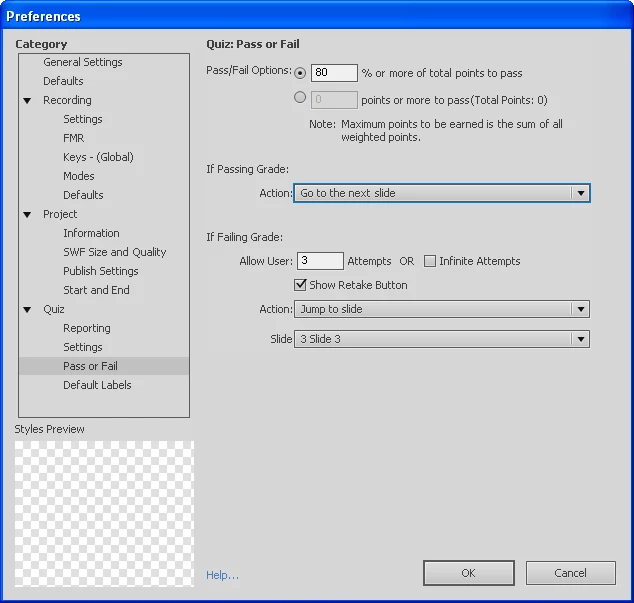
Thanks in advance...

Noel

This topic has been closed for replies.
Correct answer Lilybiri

Noel,

You do not need the action On Failure for the purpose of Retaking the quiz, the Retake button will immediately navigate the user to the slide with the first scored object, which is in your case the first question slide. Unless you have a scored object on slides 1 or 2. The action On Failure will only be executed when all Quiz attempts are exhausted and the user clicks the Continue button, so I do not know if you really want to return the user to the first Question slide in that case? If you want them to Review, better enable Review in Quiz, Settings. In that case, to avoid confusion, drag the Review button under the Retake button, so that it will get visible only when all attempts are exhausted.

I tried to explain those functionalities... in a blog post. But you probably knew that

Lilybiri

1 reply

Lilybiri
LilybiriCorrect answer
Legend
June 11, 2012

Noel,

You do not need the action On Failure for the purpose of Retaking the quiz, the Retake button will immediately navigate the user to the slide with the first scored object, which is in your case the first question slide. Unless you have a scored object on slides 1 or 2. The action On Failure will only be executed when all Quiz attempts are exhausted and the user clicks the Continue button, so I do not know if you really want to return the user to the first Question slide in that case? If you want them to Review, better enable Review in Quiz, Settings. In that case, to avoid confusion, drag the Review button under the Retake button, so that it will get visible only when all attempts are exhausted.

I tried to explain those functionalities... in a blog post. But you probably knew that

Lilybiri

June 11, 2012

Hi Lilybiri,

So if I want the learner to have 3 attempts at getting the quiz right:

I would have the above settings but would NOT tick "Show Retake Button"

The result would be when the user finishes the quiz and they get to the result screen, they would see their result and when they click "Continue" and they would be taken back to the start of the quiz. This would happen two times (3 attempts in total) and if they still failed on 3rd attempt the "Continue" button would move them forward to the end...is that how it works ?

Sorry if I seem to be slow on the uptake with this one...

Noel

Lilybiri
Legend
June 11, 2012

Yes, if you configure it that way, it will be executed as you described. Just wanted to warn you, in case you have the Review enabled and a Review button, that it can be confusing. If the user clicks the Review button, he loses all available attempts left.


Lilybiri