


Known Participant
April 24, 2018
Question

Shadow and reflection help

  • April 24, 2018
  • 4 replies
  • 1865 views

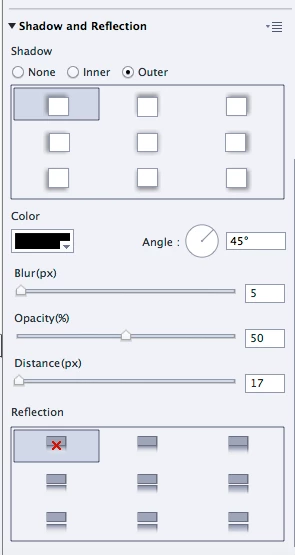
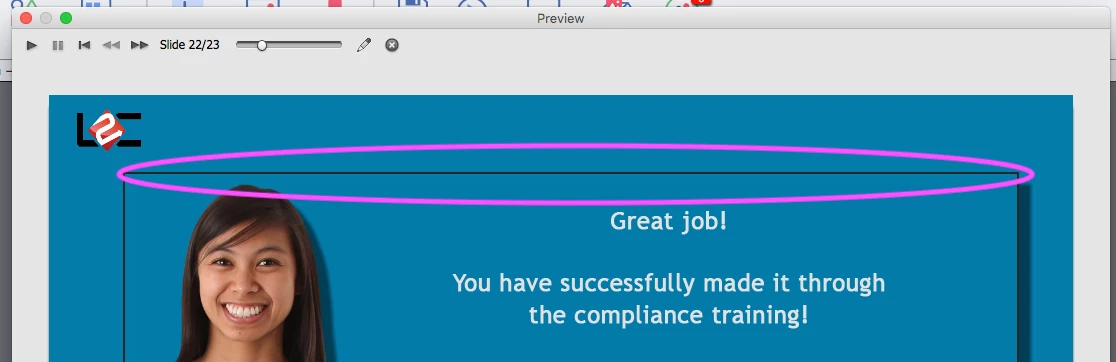
I have been using the shadow/reflection feature in my training.  When I preview it inside captivate, the drop shadow is only at the bottom left. which is what I want. however, when i publish it, it appears throughout the entire shape.   What am I missing?  I dont want it all the way around the image.

Here are my settings.
Here is my "preview":  Area inside the pink circle is the concern.
Here is my published:

    This topic has been closed for replies.

    4 replies

    Known Participant
    May 10, 2022

    I am using Captivate 2019 and this is still not fixed in 2022.

    A shape with a stroke will show the "shadow stroke" through the fill of an opaque smart shape. 

    Lilybiri
    Legend
    May 10, 2022

    Opaque shapes will not show stroke shadow, at least not for me. Even partially transparent shapes do not have that anymore. Which exact version of Captivate are you using, because CP2019 covers a lot of releases. Check under Help, About Captivate.

    Known Participant
    May 10, 2022

    Release # is 11.5.1.499


    In this image the top left is how it appears in Captivate and the bottom left is how is appears when published. Shape is opaque white with a 5 black stroke. You can readily see the stroke's shadow through the fill.


    Known Participant
    April 24, 2018

    Thats what I was thinking... because it would drive me nuts not having the shadow... I tried taking it away, adding it back etc..  Its the stroke. If i dont have a stroke in there, its fine...

    sabre123
    Participating Frequently
    April 24, 2018

    Yep, I noticed that about the stroke.

    Inspiring
    April 26, 2018

    I had the same problem....no solution.

    CP9 - Outer shadow appears inside the smart shape.

    Known Participant
    April 24, 2018

    So weird- I checked it again and you're right - the colors are different between captivate preview and the browser...   I am surprised by that

    sabre123
    Participating Frequently
    April 24, 2018

    Is the rectangle a filled shape or just an outline? It looks like it's the latter and that would explain why the drop shadow appears as it does. You need to have a filled object to get the effect that you're after.

    Known Participant
    April 24, 2018

    They are filled in with color and at 100%

    In preview mode:

    In published version:

    sabre123
    Participating Frequently
    April 24, 2018

    That's odd. HTML5 or SWF?

    The colors in the object properties don't match the colors of the objects. Did you have one selected when you screen captured it?