RyanS_Extron4075776
Inspiring
May 23, 2019
Question

Shadows and Reflection Not Working in States

  • May 23, 2019
  • 1 reply
  • 1596 views

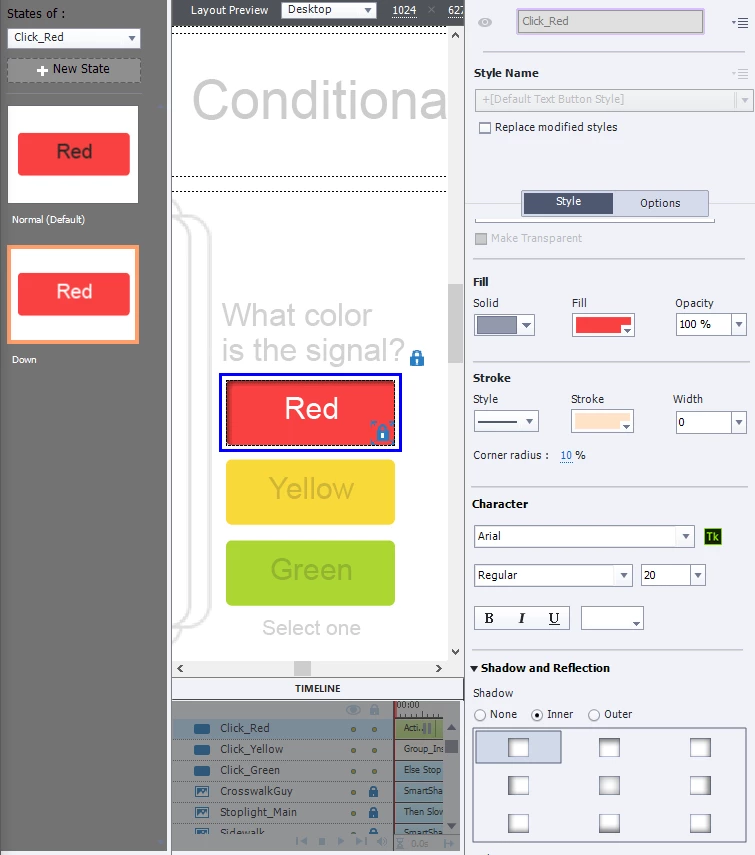
I can't get the shadow or reflection to show up in any state except the default state. I'm not sure why the Shadow and Reflection area is not grayed out if it can't be used for the other states.

This topic has been closed for replies.

1 reply

Lilybiri
Legend
May 24, 2019

Which version are you using? You seem to talk about InBuilt states which have restrictions. Have a look at this short video:

Reflection and Shadow in States

For the button InBuilt states: no problem to add a shadow to a Visited state, will show up in the Object State panel. For the Rollover and Down, it will show up in Preview HTML in Browser, but seems to be invisible in the Object State panel. Did you test in Preview,

.:

RyanS_Extron4075776
Inspiring
May 24, 2019

I am using 2019 Release, version 11.0.1.266

Below, I placed a drop shadow in the visited state, and when I tried in preview, it did not show up.

Lilybiri
Legend
May 24, 2019

Now I see that you use that old Text Button (was not visible on the first screenshot. That is the button type which normally looks like the default buttons on your system. I never use that button, only transparent and shape buttons. Why does it have to be that type?

With shape buttons you have most freedom of style. The only place where I use transparent buttons is for the embedded buttons on quiz/score slides, because you cannot use shape buttons to replace them.