

rht68685969
Inspiring
Mar 12, 2019 8:52 PM UTC
Answered

Shape button gets weird when pressed

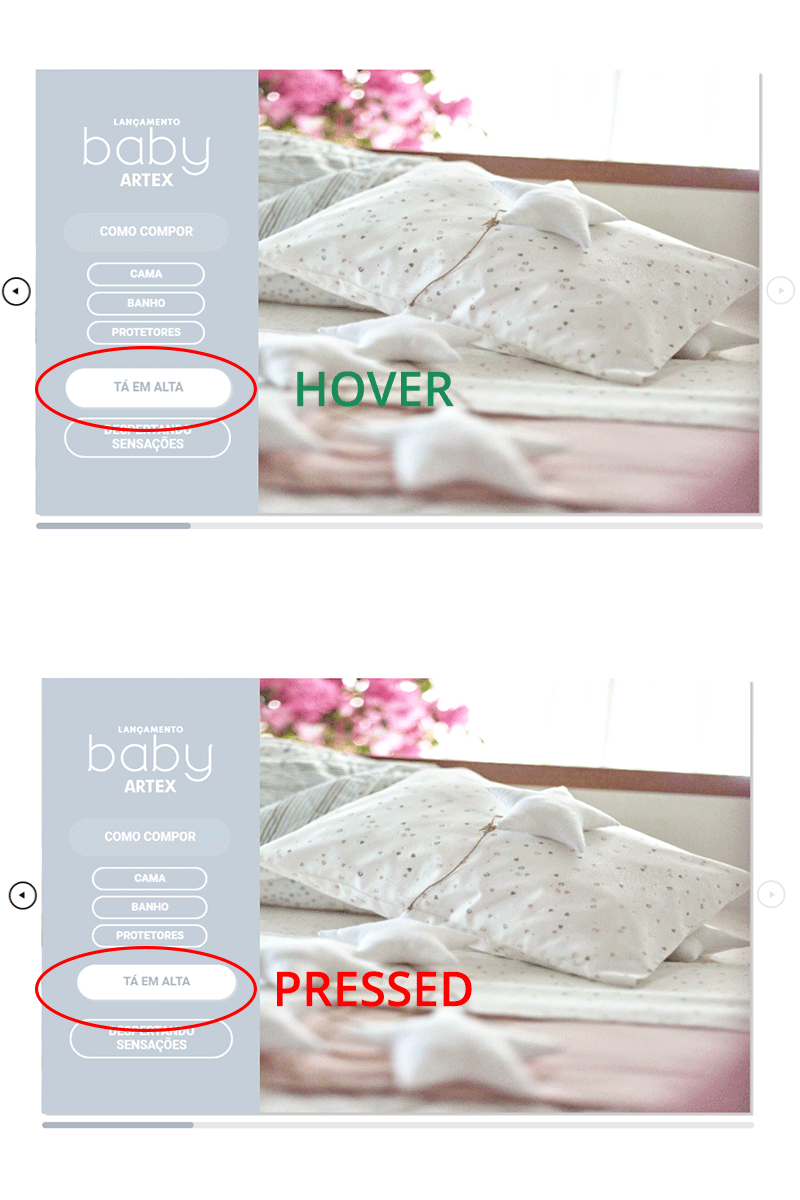
Hi. I'm using shape buttons without the "Pressed" state, I've deleted that. But when I click on them, the button moves and distorts like if there was an "On Click" state. Why? Is there a way to fix that? The button states are only Normal and Rollover.
This topic is closed to new replies. Start a new post to keep the conversation going.
Lilybiri
LilybiriCorrect answer
Legend
Mar 13, 2019 12:31 PM UTC

Reason why I always use Down state. Make it identical to Normal state.

3 replies

Lilybiri
Legend
Mar 12, 2019 10:32 PM UTC

Which version are you using please? Captivate used to have the shrinking before.

Translate
rht68685969
Inspiring
Mar 13, 2019 11:14 AM UTC

Version 11.0.1.266

EDIT:

Apparently I could solve it by creating the "Down" state just like as the Normal state. So, deleting the "Down" state causes that..

But still is a little shrinked somehow..

Translate
Lilybiri
LilybiriCorrect answer
Legend
Mar 13, 2019 12:31 PM UTC

Reason why I always use Down state. Make it identical to Normal state.

Translate