Known Participant
May 19, 2021
Answered

Shape used as button

  • May 19, 2021
  • 1 reply
  • 1249 views

Hello I have three smart shapes that I am using as buttons on a slide. They are all set to pause at the end of the slide. When I upload the SCORM file to our LMS, that slide automatically goes to the next slide once the audio is complete without any of the buttons being clicked. How can I prevent this, it has never happened before. 

    This topic has been closed for replies.
    Correct answer Lilybiri

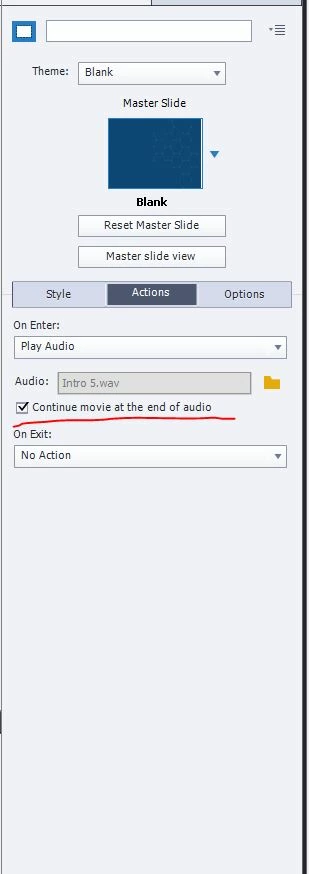
    This is my master slide. I am on the latest version 


    That is your slide, not the master slide.

    How long is the audio clip?  Uncheck the option 'Continue movei at end of audio'. Depending on the length of the clip it can override your pausing points.

    1 reply

    Lilybiri
    Legend
    May 19, 2021

    Can you post a screenshot of the timeline, and the Actions tab of the buttons?

    I prefer never to push the pausing point till the last frame, leave a short part after that point.

    Known Participant
    May 19, 2021

    The three big buttons have advanced actions which I have included a screenshot of. The "next" button has an action of "go to the next slide" 


    Lilybiri
    Legend
    May 19, 2021

    Please move the pausing points 0.1 seconds in.

    A tip: it is not necessary to use 'Stop Triggered Audio' at all. Even if there is another audio clip playing which has been started with Play Audio (only type which can be influenced by Stop) it will be automatically stopped when a new clip is launched with 'Play Audio'.

    You have 4 shape buttons. Do all of them have Infinite attempts?