
Tracyrobinson22
Known Participant
December 5, 2017
Answered

Shapes showing in Timeline, not Preview or Publish

  • December 5, 2017
  • 1 reply
  • 295 views

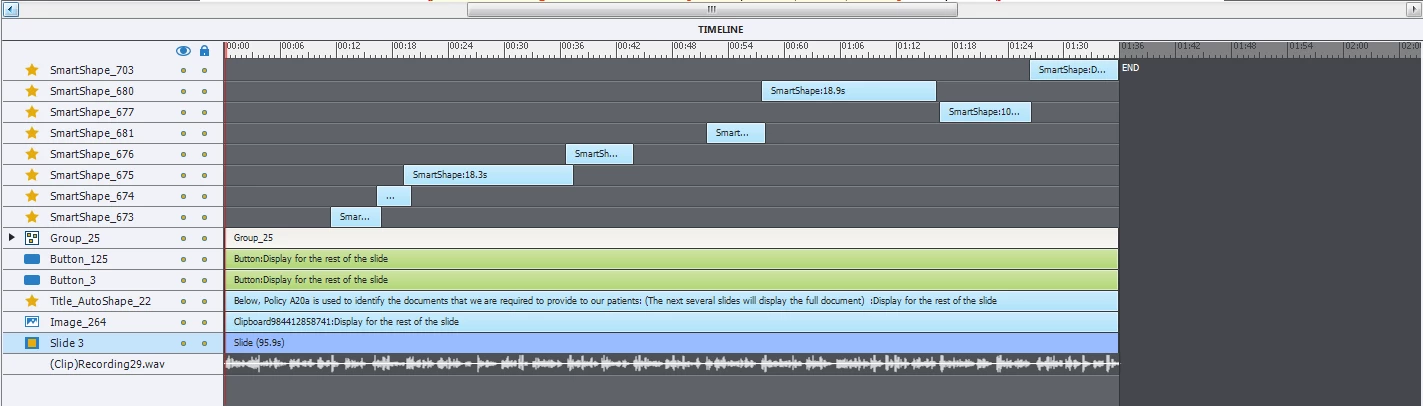
I desperately need help with Captivate 10.  I have a project with hundreds of shapes as layers (used them to circle or highlight text throughout).  When I play the slide from the timeline they are all there.  When I preview HTML in Browser, they are not there.  When I publish they are not appearing at all.  There are no holds that I can see.  What do I need to do to get these shapes to appear?  I have been using Captivate for years and have never had this issue.  Please help!
This topic has been closed for replies.
Correct answer Lilybiri

The buttons have no pausing point, I think. Sure that you don't have aother interactive object in the collapsed group? All shapes are visible in output and not covered by master slide objects?

Play slide is nnot a preview method at all, just meant for editing like synching.

1 reply

Lilybiri
LilybiriCorrect answer
Legend
December 5, 2017

The buttons have no pausing point, I think. Sure that you don't have aother interactive object in the collapsed group? All shapes are visible in output and not covered by master slide objects?

Play slide is nnot a preview method at all, just meant for editing like synching.

Tracyrobinson22
Known Participant
December 5, 2017

That was it!  There was a pause in the group!!  Thank you so much! You saved my life!

Lilybiri
Legend
December 5, 2017

You're welcome. In many questions wrong pauses on the Timeline are causing issues Have a look at the interactive movie in this article:

Timeline - Advanced Workflows - Captivate blog