


Inspiring
February 15, 2021
Question

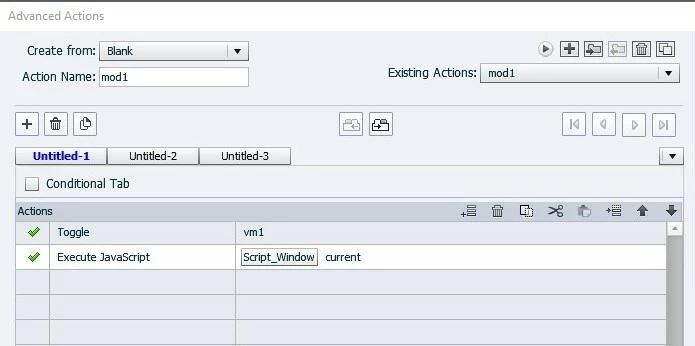
Shared action freezes using 'execute JavaScript'

  • February 15, 2021
  • 2 replies
  • 404 views

I have an advanced action I want to use on multiple with javascript and toggle a variable. The script works fine if I use it in an advanced action. The script shows and hides images in a string based on what is clicked for a visual aid I am working on. I won't pretend to be any good at JavaScript since I have no formal education in writing code of any form. Perhaps that plays a part in this issue.


I can save the advanced action as a shared action. When I try to add the shared action to a button and open the properties window, the shared action window does not allow me to change the variable, Captivate locks up and doesn't allow me to closes the shared action window.


If I make multiple buttons with individual advanced actions, it works with no problems. 
 

var mods = window.cpAPIInterface.getVariableValue("modulesQty")+1; //number of objects + 1
var firstmod = 0; 
var secondmod = 0;
var firstfull = 0; //first module broken was found == 1

function ResetIssue() { //hides all modules with a 0, not broken
    for (var h = 1; h < mods; h++) {

        var stat = window.cpAPIInterface.getVariableValue("vm" + h);
        if (stat === 0) {
            cp.hide("m" + h);
        }
    }
}

ResetIssue();

function multiIssue() { //hides all modules between 2 broken modules
    for (var h = 1; h < mods; h++) {

        var stat = window.cpAPIInterface.getVariableValue("vm" + h);
        if (stat === 1) {
            if (firstfull === 0) { //finds the first bad module
                firstmod = h;
                firstfull = 1;
            }
            if (firstfull === 1) { //finds the last module that is broken
                secondmod = h;
            }
        }
    }
}

multiIssue();

if (firstmod != 0) {
    for (var i = firstmod; i < secondmod + 1; i++) { //will hide any objecs with a variable of 1 
        cp.show("m" + i); //shows all modules between firstmod and secondmod
    }
}


    This topic has been closed for replies.

    2 replies

    TLCMediaDesign
    Inspiring
    February 16, 2021

    The issue may be that it is breaking because of the for loop, it doesn't like the less than sign.


    You could do it like this, note I only did the first function:


    var mods = window.cpAPIInterface.getVariableValue("modulesQty")+1;
    var firstmod = 0;
    var secondmod = 0;
    var firstfull = 0;

    function ResetIssue()
    {
    while (--mods) {

    (function(){

    var stat = window.cpAPIInterface.getVariableValue("vm" + h);
    if (stat === 0) {
    cp.hide("m" + h);
    }
    })(mods);
    }
    }

    mlisonbeeAuthor
    Inspiring
    February 16, 2021

    Thanks so much for looking at the script. I tried doing it your way and I can't seem to get it to work at all.


    Would the for loop have issues using !=mods instead?


    The the objective ot the script is as follows:

    Default variable of vm1 thru vm5 will = 0

    Each object m1 - m5 have a button that toggles the corrisponding variable and executes the script

    All objects are hidden by default


    First user action when button is clicked for m2:

    Variable      Object

    vm1 = 0       m1 = hide

    vm2 = 1       m2 = show

    vm3 = 0       m3 = hide

    vm4 = 0       m4 = hide

    vm5 = 0       m5 = hide


    Second user action when button is clicked for m5:

    Variable      Object

    vm1 = 0       m1 = hide

    vm2 = 1       m2 = show

    vm3 = 0       m3 = show

    vm4 = 0       m4 = show

    vm5 = 1       m5 = show

    Lilybiri
    Legend
    February 16, 2021

    Sorry not to have answered immediately. With TLCMediaDesign you have the best JS expert to help you with the script.  I am not sure if the problem is with the script or with the combination in a Shared action. When I created that game (which you have seen) I have bumped into combinations which didn't work. My planning was to explore more, but other jobs made me postpone. Maybe in the future. 


    Lilybiri
    Legend
    February 15, 2021

    I have used JS in a shared action, but you need to be very careful. Which parameters do you have? You cannot define parameters which are in the JS script. 

    Here is an example where I was successful using JS in a shared action.

    http://blog.lilybiri.com/game-using-javascript-in-a-shared-action


    mlisonbeeAuthor
    Inspiring
    February 15, 2021

    I have seen your game before so I knew it was possible.

    My only parameter is a toggle of a variable that the script uses.

    If I am understanding you correctly, I can't change variable "example"and use .getVariabeValue("example") in the script?