
Known Participant
January 20, 2016
Answered

Shared action problem - parameters

  • January 20, 2016
  • 1 reply
  • 745 views

I have an advanced action that assigns a number of values to variables created in Captivate. As shown in the figure below.
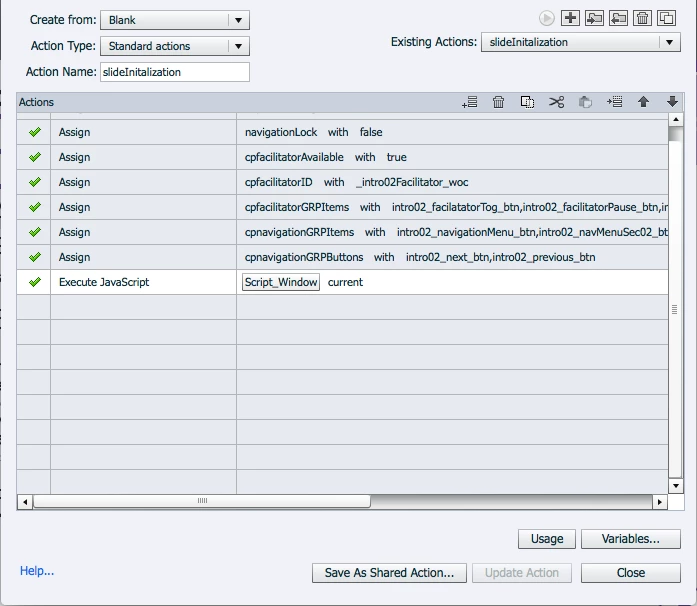
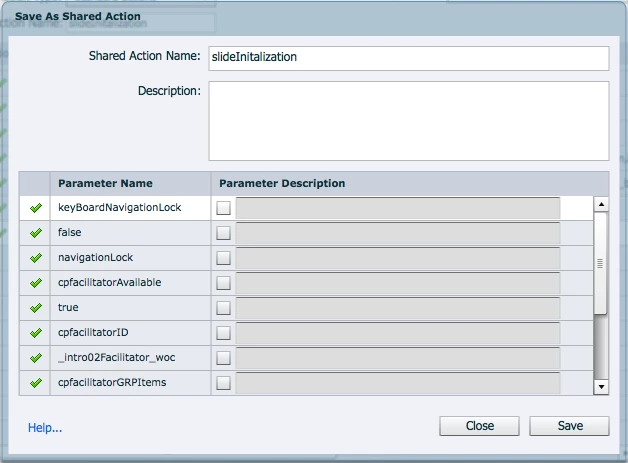
In it navigationLock is set to false. When the shared action is created, as seen below, there is no listing for the setting of the false parameter for the navigationLock variable. Has anyone else experienced this? Is there a work around?
Thanks for any assistance that anyone can provide.

Message was edited by: Lieve Weymeis: it is not an error, everything in the parameter list is correct.

This topic has been closed for replies.
Correct answer Lilybiri

Did you read that blog post? I do see the 'false' as second item in the Parameter list. But if you use 'false' several times in the advanced action, it will only show up once in the list. That is why I tried to explain that it is a bad idea to define such a boolean value as a parameter. Same when you have the variable appearing several times in the advanced action, it will appear only once as candidate parameter and you have to be careful. Not every advanced action is suitable to be converted into a shared action, reason why I wrote several blog posts, and I'm writing a book at this moment.

Like any new feature you have to learn how it is functioning, what its possibilities and limitations are. I have been exploring shared actions quite a lot since they appeared with CP7, and acquired some insight, to help judge if an action is suitable to become a shared action or not.

BTW this is NOT a shared action error, I will change the title. You have an issue with understanding the shared action, it is not a bug nor an error.

1 reply

Lilybiri
Legend
January 20, 2016

You are probably totally new to shared actions? Have a look at my articles about them, the most important you should read is this one:

Parameters in Shared Actions - Captivate 7 vs. 8 - Captivate blog

All your parameters are 'candidate-parameters' (term I use in the blog post): contrary to objects and groups, variables and literals are in that category: you can but you don't have to define them as parameters. That is very useful IMO. For the parameters that you need, check the box to the right of the name and before the description field. Then you'll be able to enter the description and this will be come a parameter in the same meaning as the objects and groups, can be chosen with the P button.

May I offer you a tip: be careful with those very loooooooong names! They are difficult in dropdown lists even when you use filtering. Also I would never indicate true or false (I use mostly 1/0 for Booleans) as a parameter, certainly not in this case! Would you ever want the variable 'navigationLock' be set to true when getting to a slide?

In case you are not aware of another possible issue: never use the variable label for another name, that is the reason I always start variables with the identifier v_

romainjAuthor
Known Participant
January 20, 2016

Hi Lilybiri,

Thanks for the reply. The question I have is why the false listed in the "Assign navigationLock with false" does not appear in the shared action list. The keyboardNavigationLock has the option of entering a literal and that option is not available in the shared action for the navigationLock, which is the variable who's value will be changing. For certain slides depending on the requirements navigationLock will be set to false the first time the slide is entered and then updated and stored in the LMS for future reference. For this particular project 90% of the functionality will be handled by JavaScript. Hence the current setup.

Thanks for any light you can shed.

John :-)

Lilybiri
LilybiriCorrect answer
Legend
January 20, 2016

Did you read that blog post? I do see the 'false' as second item in the Parameter list. But if you use 'false' several times in the advanced action, it will only show up once in the list. That is why I tried to explain that it is a bad idea to define such a boolean value as a parameter. Same when you have the variable appearing several times in the advanced action, it will appear only once as candidate parameter and you have to be careful. Not every advanced action is suitable to be converted into a shared action, reason why I wrote several blog posts, and I'm writing a book at this moment.

Like any new feature you have to learn how it is functioning, what its possibilities and limitations are. I have been exploring shared actions quite a lot since they appeared with CP7, and acquired some insight, to help judge if an action is suitable to become a shared action or not.

BTW this is NOT a shared action error, I will change the title. You have an issue with understanding the shared action, it is not a bug nor an error.