
Inspiring
November 6, 2018
Answered

Show/Hide works as normal in .swf but not in html5

  • November 6, 2018
  • 2 replies
  • 1284 views

We are using Captivate 9 for this project.

On a slide, a particular micro nav icon is hidden until a particular sequence has been viewed. When the viewer clicks a micronav icon, the icon advanced action shown should toggle from the default "Not visible in Output" to Show. In the published .swf file, it performs as expected.
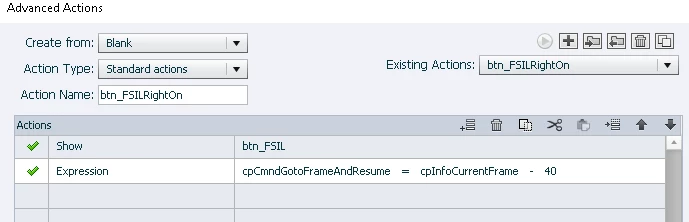
When published as an HTML5 output, the Show is ignored but the expression executes as it should.

Any ideas on what is causing this?

This topic has been closed for replies.
Correct answer TLCMediaDesign

The only way I can get it to work is to show the button using JavaScript.

document.getElementById("btn_FSILc").style.visibility="visible";

2 replies

Lilybiri
Legend
November 6, 2018

HTML output is much more sensitive. Did you try to add Enable after the Show command?  I would also prefer not to use Invisible in Output, but to use a conditional action that Disable/hide the button if necessary and Show/enable in the second situation.

KB in FLAuthor
Inspiring
November 6, 2018

Hi Lilibiri:

Have not tried that approach, YET. May have to if I can't resolve it otherwise.

TLCMediaDesign
Inspiring
November 6, 2018

Can you post an image of the timeline?

KB in FLAuthor
Inspiring
November 6, 2018

The timeline looks like this.

TLCMediaDesign
Inspiring
November 6, 2018

Are you clicking SmartShape_309 to show the button and navigate?