
July 13, 2019
Answered

simple advanced action will not work

  • July 13, 2019
  • 2 replies
  • 1533 views

Hi

I have a very simple advanced action. It does 2 things.

1. Assigns a variable.

2. shows a "next" button

On success of clicking a button nothing at all happens on one slide.

The other 5 slides with similar AA's work perfectly.
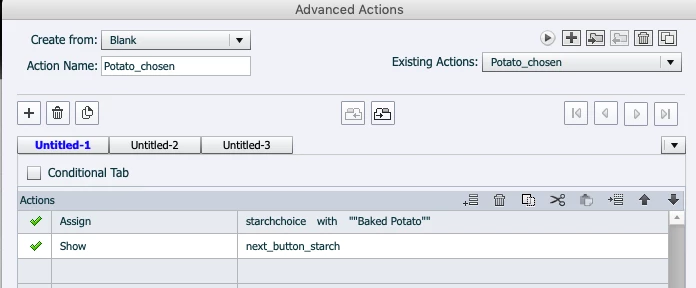
1. I have deleted the variable and advanced action and rewrote them.

2. i have completely rebuilt the slide from scratch and nothing works.

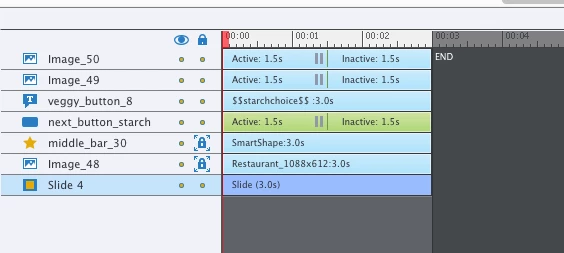
the timeline looks like this. And the on enter for slide is set to no action
I am running out of options.

    This topic has been closed for replies.
    Correct answer shreya

    Hello,

    I can see 2 quotes around Baked Potato. So while assigning the variable do not use any double quotes. Captivate will automatically generate the quotes if you have space Eg: Baked Potato.

    Please try this out.

    Hope this helps.

    Otherwise you can share a sample slide where you are seeing the issue.

    Regards

    Shreya Gupta

    Adobe Captivate Engineering.

    2 replies

    shreyaCorrect answer
    Adobe Employee
    July 15, 2019

    Hello,

    I can see 2 quotes around Baked Potato. So while assigning the variable do not use any double quotes. Captivate will automatically generate the quotes if you have space Eg: Baked Potato.

    Please try this out.

    Hope this helps.

    Otherwise you can share a sample slide where you are seeing the issue.

    Regards

    Shreya Gupta

    Adobe Captivate Engineering.

    Lilybiri
    Legend
    July 15, 2019

    Thanks Shreya, I missed this on the tiny screenshot and am glad you posted your answer.  In the future will always ask to see the Preview of the action, at least that is better readable. You have probably very young eyes....

    Lilybiri
    Legend
    July 15, 2019

    @kurtfar I sincerely apologize, but I had not detected the multitude of quotes in the AA screenshot, my eyes are pretty bad. Next time will ask for Preview screenshot (as I mostly do).

    You have to know that Captivate inserts automatically double quotes surrounding a string when you have a space in the string. You added extra double quotes to the string, and Captivate is choking on that. I am not even able to do so, Captivate generates an error or crashes when I do sot. But I am on a Win system, not Mac.

    What I mean by Preview action and why it is better not only because font is bigger: it give you a clear view of complete advanced action, with the translated JS equivalent of the point and click advanced actions. Easier to detect bugs.

    Stagprime2687219
    Legend
    July 13, 2019

    Hmmm... does seem odd.

    Hard to tell for sure without being able to look at a few other things.

    Here are a couple areas I would start to look.

    I would verify spellings and I wonder if my other variable assignments have dual double quotes like the ""Baked Potato"".

    Also - did you remember to create the starchchoice variable under Project >> Variables... ? Double check spelling there too.

    Looking at timeline - what is the user clicking on to make the next_starch_button appear?

    I see veggy_button_8 is named as a button but it does not appear to be one. It looks like it is meant to display your variable.

    When you preview the project - does that appear blank (variable recognized) or does it actually read $$starchchoice$$ - that would indicate a typo.

    Image_49 and Image_50 - are they being used as a buttons? They have a pause on them. Did we get the right one and properly assign the Potato_chosen action to it?

    Just some places to look - hopefully one of them takes care of it.

    As a side note.

    Piece of advice from me - take it as you would - I never use symbols in my naming conventions.

    No spaces, no dashes, no underscores. I see them as issues waiting to happen.

    July 13, 2019

    thank you i like your advice on naming conventions.Think i will go with it.

    here is a wider snapshot for more context. The 2 buttons, potato & french fries are now labeled. The text caption is the variable on the slide.the user is to click either the potato or fries and then the name will be assigned to that variable then the next button should appear. The other slides are for ordering main course, drinks and salads. each have 2-3 choices and they all work properly.

    It's a head scratcher!

    July 13, 2019

    additionally when i click the potato or fries nothing happens