


Known Participant
April 21, 2022
Answered

Simple Expression Not Working

  • April 21, 2022
  • 2 replies
  • 416 views

Hello,

Captivate 2019, Build 11.5.5.553

I've encountered an issue with some recently developed modules where a very simple expression is not working. We use a progress display that shows X of X slides. It's a text caption that uses:

$$cpInfoCurrentSlide$$ of $$cpInfoSlideCount$$


We've added additional slides that are not part of the instructional content, so to subtract these from the slide count we're using:

Expression  _TotalSlides = cpInfoSlideCount - 2


Regardless of the expression in the slide advanced actions, it only shows the total slide count. What makes this puzzling is this issue exists only in the modules created by the same developer using the same corporate template (.cptx) that we use for all our in-house/corporate training. None of our other modules have this issue.

Is there anything can override an expression? Here is the title slide advanced actions - very simple.
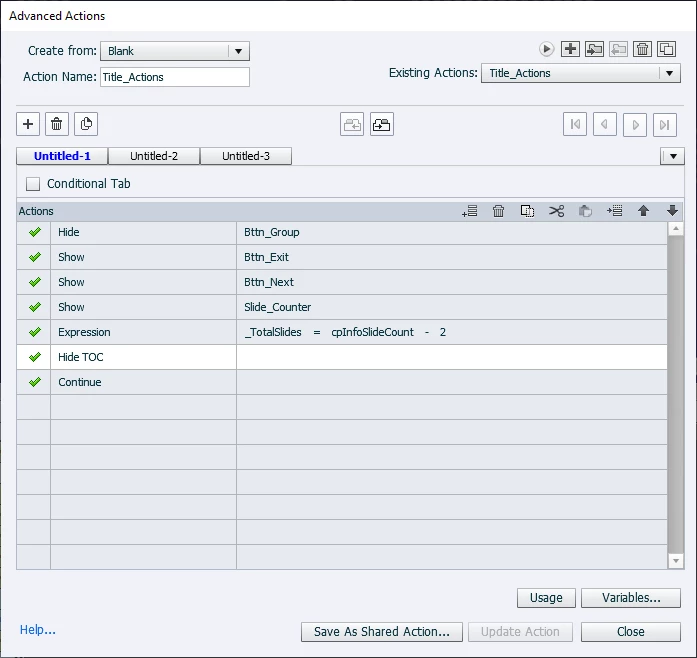
There are 13 slides in the project and that's what shows in the slide counter despite the expression

Thanks as always.

    This topic has been closed for replies.
    Correct answer OH_CP_Lover_&_Hacker

    If I understand your issue...


    On your slides you have the 1 of 13 slide counter made made with a text area using the following vars to display the numbers - $$cpInfoCurrentSlide$$ of $$cpInfoSlideCount$$..


    Then you are using an expression (_TotalSlides = cpInfoSlideCount - 2) that to correct the slide count as a result of 2 extra slides...... so instead of 13 slides you should be seeing total of  1 of 11 slides....


    If so, that fix would be to change the progress display that shows X of X slides from $$cpInfoCurrentSlide$$ of $$cpInfoSlideCount$$ to this $$cpInfoCurrentSlide$$ of $$_TotalSlides$$

    That should fix your issue......you have the wrong var being used in the progress text area...as you need to update it to use the var you are calculating via your expression....

    2 replies

    Lilybiri
    Legend
    April 21, 2022

    You don't tell which event is triggering this action? 

    However you need to use the correct variables for the progress indicator like this:

     $$cpInfoCurrentSlide$$ of $$_TotalSlides$$

    B_P_HAuthor
    Known Participant
    April 21, 2022

    Lilibiri, I'm not sure what your asking regarding the event triggering the action - it's a slide On Enter advanced action. 

    Thanks for your reply.

    OH_CP_Lover_&_Hacker
    OH_CP_Lover_&_HackerCorrect answer
    Inspiring
    April 21, 2022

    If I understand your issue...


    On your slides you have the 1 of 13 slide counter made made with a text area using the following vars to display the numbers - $$cpInfoCurrentSlide$$ of $$cpInfoSlideCount$$..


    Then you are using an expression (_TotalSlides = cpInfoSlideCount - 2) that to correct the slide count as a result of 2 extra slides...... so instead of 13 slides you should be seeing total of  1 of 11 slides....


    If so, that fix would be to change the progress display that shows X of X slides from $$cpInfoCurrentSlide$$ of $$cpInfoSlideCount$$ to this $$cpInfoCurrentSlide$$ of $$_TotalSlides$$

    That should fix your issue......you have the wrong var being used in the progress text area...as you need to update it to use the var you are calculating via your expression....

    B_P_HAuthor
    Known Participant
    April 21, 2022

    You understand my issue 😉

    This did indeed solve the problem but I don't get why this is working correctly in other modules. Between me and another developer we have created 11 other modules that use my original slide count variables and expression and they all work correctly. Regardless, I will update all the modules to the correct variable.

    Thanks for your help.