

Dirlo
Inspiring
September 30, 2019
Question

Simplify multiple adanced actions with JavaScript ?

  • September 30, 2019
  • 8 replies
  • 667 views

...

Hello Captivaters !...

I'm working on a project where visitors have to reproduce figures...

This is what it looks like :
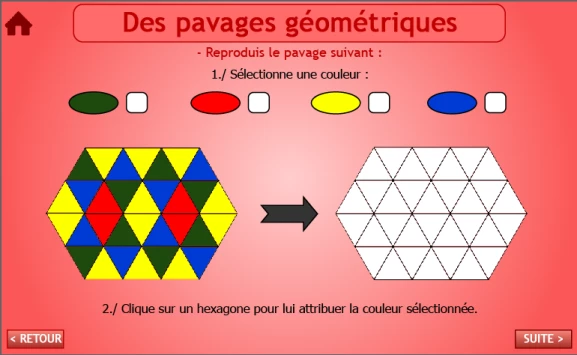
As you can understand it easily, first the learner has to select a color. And then click on a triangle to change its color with the selected one...

All the white triangles are in fact buttons with 5 differents states (normal is white, then there is a Green, Red, Yellow and Blue state)...

I created a variable "v_Color". And by clicking on the colored button on top of the image, I assign a name to this variable (Green, Red, Yellow or Blue).

So for example if my first white button triangle is named "T_01" when I click on it I play an advanced conditional action with 4 conditions :

If "v_Color" is equal to "Green"

=> Modify the state of "T_01" to "Green"

If "v_Color" is equal to "Red"

=> Modify the state of "T_01" to "Red"

If "v_Color" is equal to "Green"

=> Modify the state of "T_01" to "Yellow"

If "v_Color" is equal to "Red"

=> Modify the state of "T_01" to "Blue"


And everything is perfect !...


But as you can see, there are many triangles !!!... And I have to change the action on each one... That means a lot of actions !...

So I'm sure it's possible to simplify this with only one javascript action like :

=> Clicking on "this" (instead of the name of the button)

If "v_Color" is equal to "Green"

=> Modify the state of "this" to "Green"

If "v_Color" is equal to "Red"

=> Modify the state of "this" to "Red"

...

So only one action will be performed for each button/triangle...

I need your help to code this "this"... !!!...

Thanks in advance !...

😉

...

    This topic has been closed for replies.

    8 replies

    Dirlo
    DirloAuthor
    Inspiring
    September 30, 2019

    ...

    Thanks to Gaanf's answer, it's solved !...

    In fact I assign my Color with Captivate (As I want the small selector near the color to be on or off)...

    And only this line of Javascript did the trick to color my selected object (as an action - execute Javascript) : cp.changeState(this.document.activeElement.getAttribute("ID"), V_Color);


    So easy so, when you masterize Javascript !!!...

    I spent so many hours yesterday to do that (I already made 2 similar projects before coming here for help) !... And now in 2 minutes it's done !!!!...


    Big thank again to both of you !...

    😉

    ...


    Inspiring
    September 30, 2019
    Glad it works for you. 'this.document.activeElement.getAttribute("ID")' is a generally good way to identify which Object was last clicked or interacted with.
    Dirlo
    DirloAuthor
    Inspiring
    September 30, 2019
    I will keep this in mind !... So useful (if needed)... Happy Captivating !... 😉
    Dirlo
    DirloAuthor
    Inspiring
    September 30, 2019

    It could be easy ???...


    var V_Color;

    if (V_Color==''Green'') {
    cp.changestate(''This'',''Green'');
    }

    if (V_Color==''Red'') {
    cp.changestate(''This'',''Red'');
    }

    if (V_Color==''Yellow'') {
    cp.changestate(''This'',''Yellow'');
    }

    if (V_Color==''Blue'') {
    cp.changestate(''This'',''Blue'');
    }


    Just need to replace this "THIS" !!???...

    Inspiring
    September 30, 2019

    This would also be a use case for Shared Actions, eliminating the need for JavaScript in the first place. But also possible with js, if you'd prefer this. Here's one appropach (there's sure others): 

    Name the four color selector buttons with the color they represent respectively, so the one that selects green call 'Green', the one that selects red call 'Red', etc.

    Put the following line of JavaScript on all of those selector buttons (on Current Window): 

    v_Color = this.document.activeElement.getAttribute("ID"); 

    This will populate your v_Color variable with the correct color string on every click on any of those buttons. 

    Create a non-conditional Advanced Action (or Shared Action) and have it fire the following line of js on the Current Window:

    cp.changeState(this.document.activeElement.getAttribute("ID"), v_Color);

    Assign this action to all your triangles. This should change the clicked triangles' state to the color state that has been specified by clicking on the desired color selector button before, provided all your triangle have the Green, Red, Yellow and Blue state labeled correctly in upper case, and your selector buttons ar labeled correctly with those colors in upper case as well.

    Dirlo
    DirloAuthor
    Inspiring
    September 30, 2019
    Thank you Gaanf !!!... It seems to work !!!... I will answer my first post later (as it's not easy to answer directly here...)
    Inspiring
    September 30, 2019

    Hi, I'm a newbit to Captivate and Java is not my speciality, but was wondering can you not created a Shared Action so that for each triangle you select the shared action and only need to pass in the ID of the triangle in question?


    Phil.

    Dirlo
    DirloAuthor
    Inspiring
    September 30, 2019
    Thanks !... I already think of this... And just try it with success... But I still have to define the button name... And the four states... so 5 clicks for each... And I want to learn javaScript in Captivate !!!...