Known Participant
January 28, 2016
Answered

Simulation-move to next slide without clicking any button

  • January 28, 2016
  • 2 replies
  • 652 views

I wanted to create a simulation, I thought that it moves to the next slide automatically and only if I want to include a button or whatever that the user needs to click then this action would force them to really click to move to the next slide.

But in my case I have to click almost always on that next or play button, which is annoying. is there any way to fix this?

thanks for help.
    This topic has been closed for replies.
    Correct answer Lilybiri


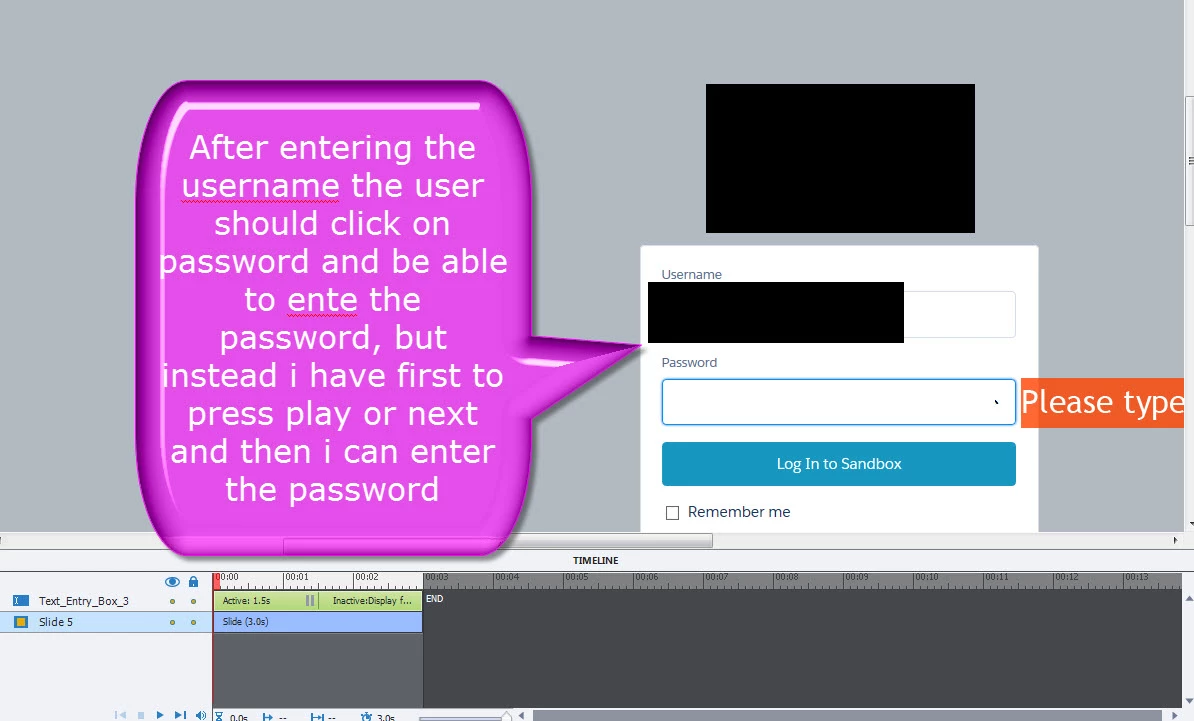
    One of the two typical interactive objects that Captivate will insert in a Training simulation: a Text Entry Box. Simulation is waiting for the user to enter the correct text in this TEB and use Enter to confirm. What is wrong with that? The other typical object is a click box over a 'hotspot' that has to be clicked by the user. Both those objects will pause the slide until the user interaction has been done.

    2 replies

    Lilybiri
    Legend
    January 28, 2016

    I suspect that you used the Training Simulation mode when capturing? But from what you explain it looks more like you need the Demonstration mode. Training simulation supposes that the user has an interaction on each slide to proceed, Demonstration will be a more passive experience.

    TammyDVAuthor
    Known Participant
    January 28, 2016

    well I want to simulate how to do certain steps in a tool. I want them to login, create a case etc etc like it was in a realtime tool. So yes I did use the training simulation option. some slides do move on automatically but some just don't and I cant explain myself why. I checked the different boxes as well to see if this is kinda of the root cause but cant find any answers.

    Lilybiri
    Legend
    January 28, 2016

    If they don't advanced automatically, they are waiting for an interaction by the user and this should be visible on the Timeline. Maybe post some screenshots of the Timeline of slides that don't advance?

    RodWard
    Community Expert
    Community Expert
    January 28, 2016

    Sounds like you need to check your slides for objects that might be pausing the play.  Click boxes, buttons, text entry boxes etc.