Participant
February 12, 2013
Answered

Simulation to MP4: Distorted Slides or Audio

  • February 12, 2013
  • 2 replies
  • 1909 views

Hello,

I mainly use software simulation. However, when I publish the video for YouTube, the MP4 includes some visually distorted slides (e.g. with parts of two slides on each other or with red blocks), as well as missing mouse clicks, and "poff" sounds and/or spoilt parts at the beginning of auido on a slide. Sometimes, when I republish the problem disappears from one section and appears in another section.

I tried both Windows 7 (even a newly installed OS) and Mac OS 10.6.8.

Sometimes, the problem was just in the player; but I have tried several players and the problem appears on all of them.

For the audio, I use the TTS NeoSpeech Adobe plugin.

I use the latest Adobe Captivate version 6.0.1.240

I have files showing the problems with their corresponding project files, but I cannot publish them publicly. If someone from the Adobe Support can contact me so that I send them the files, I will highly appreciate that.

Kind regards,

Mina
This topic has been closed for replies.
Correct answer Mina MMMH

Dear All,

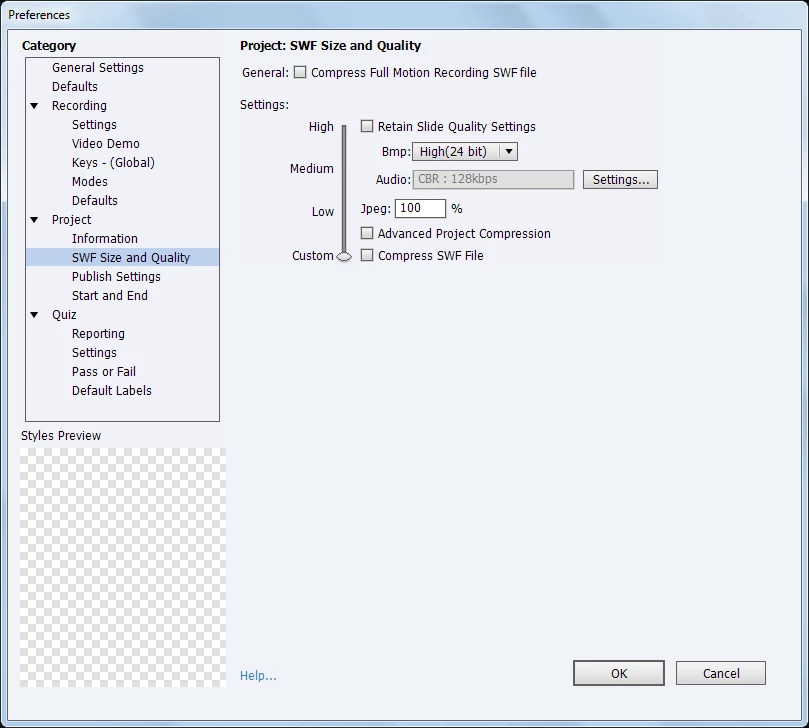
I have received this suggestion from the support, and it solved my main problem of distorted images: go to Edit > Preferences > SWF Size and Quality > move the slider down to "Custom" and deactivate the two options of compression.

According to the manual:

Advanced Project Compression Enables Adobe Captivate to take into account only the difference between two slides instead of publishing both the slides. The compression reduces the size of the published project. Choosing this option can increase the time taken to preview or publish the project. Compressed projects sometimes do not play as intended in Flash Player.

Please read the last sentence. If this option is serious like that, I am not sure why it is activated by default. I think it should be deactivated by default.

Derek, could you please let us know if this helps you. Many thanks in advance!

Kind regards,

Mina

2 replies

Participant
February 27, 2013

I'm having similar problems on publishing to mp4 - it's taking essentially a static image with a voiceover and distorting the video making it look like it's bad reception on a TV.  Choosing the "Force re-publish all the slides" option has no effect.  This is Captivate 6.1.0.319 on a PC (Win7 64-bit).

Mina MMMHAuthorCorrect answer
Participant
February 27, 2013

Dear All,

I have received this suggestion from the support, and it solved my main problem of distorted images: go to Edit > Preferences > SWF Size and Quality > move the slider down to "Custom" and deactivate the two options of compression.

According to the manual:

Advanced Project Compression Enables Adobe Captivate to take into account only the difference between two slides instead of publishing both the slides. The compression reduces the size of the published project. Choosing this option can increase the time taken to preview or publish the project. Compressed projects sometimes do not play as intended in Flash Player.

Please read the last sentence. If this option is serious like that, I am not sure why it is activated by default. I think it should be deactivated by default.

Derek, could you please let us know if this helps you. Many thanks in advance!

Kind regards,

Mina

Participant
February 27, 2013

It did not change it for me.  What did work was having the video converted from mp4 to...  mp4 using a third party tool.  Something in that process cleaned up the video.  Still would be nice to be able to get it to publish correctly the first time.

Lilybiri
Legend
February 12, 2013

I'm not from Adobe support, but which slide quality do you use?

Mina MMMHAuthor
Participant
February 12, 2013

Thanks for your reply, Lilybiri.

I use "High (24-bit)". Could that cause problems?

Even with such quality, I do not get the clear vision I need, especially that I have a logo in red badly affected by low slide quality; that is why I use "High (24-bit)".

Many thanks!