
Inspiring
November 17, 2015
Answered

Simulation with two correct answers

  • November 17, 2015
  • 1 reply
  • 729 views

I am trying to offer a choice of two different click boxes in assessment simulation. I think I could use a conditional advanced action where the clicking of either named box records as correct and all else =0. However, I cannot figure out how to work this score into the simulation score. Preceding this screen I have more than 20 other items--click boxes and TEBs, that accumulate a score on the assessment.
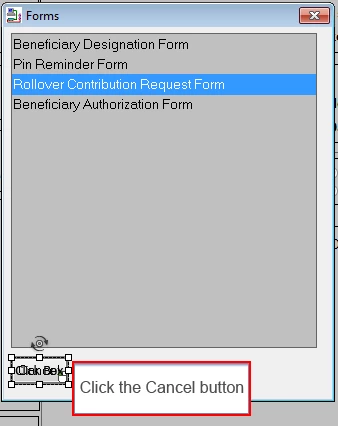
I have attached a portion of the screen, showing the correct box over the Cancel button. What I want to add is a "correct" click box over the red X.

Any suggestions welcome. Thanks. In Captivate 7 on this, so if I need to move to Cp8 let me know.

This topic has been closed for replies.
Correct answer Lilybiri

Hi,

Got pulled away from this and just getting back.

I think maybe my question wasn't clear enough. I did check the resources you sent. They are very informative. However, I do  not see how to make both items correct on a single slide without adding to the basis points in the simulation. That's what I needed to do in order to have the student have a CHOICE of responses without penalizing them for the choice.

I am simply covering up one of the options and making them pick one.

Thanks again for sharing.


Maybe you didn't understand. I used the same approach for my simulations. Do NOT attach a score to both work flows, but to a Next button. You have to be sure that the total score has only one score for each slide, hence using the Next button. Show the Next button with the score for both work flows, doesn't matter which one they choose.

1 reply

Lilybiri
Legend
November 17, 2015

As you know, all scores will be added to the total score (with exception of the feature Branch aware which is not an option here).

Just one idea: in a simulation the playhead will continue automatically when the click is successful or the attempts are exhausted. You could add two interactive objects (Next?):

  1. with the wanted score, set it to invisible in output
  2. with a null score, set it also invisible in output.

Use the clicks to trigger a conditional advanced action: if successful, show the Next button with score, if unsuccessful after last attempt show the one without a score. This action can be triggered by both clicks on the simulation slide. Add Continue to the action, and the pausing point of the Next buttons should be later than that of the click boxes.

This means quite a lot of work, but if you use a shared action with parameters, you could save time. The user will have to click twice on each slide of course.

VickCAAuthor
Inspiring
November 17, 2015

Thanks.

I am afraid this is way over my head. I know how to remove the score for the objects from the quiz. I can remove the feedback messages.

But I don't know how to set up the conditional action to identify both click boxes as variables that when clicked result in a score of 1 added to the total and then advance.

Actually when I tried to write the conditional advanced action, I could not even find those named buttons.

Maybe there is a resource you can recommend? I tried going to your blog but it is offline.

Lilybiri
Legend
November 17, 2015

Offline? I just checked, and could get on it.

In this old post I explained a similar workaround for custom questions, with two buttons:

Report Custom Questions - part 2 - Captivate blog