
Participant
June 30, 2016
Answered

Skin borders are disabled in Captivate 9

  • June 30, 2016
  • 4 replies
  • 898 views

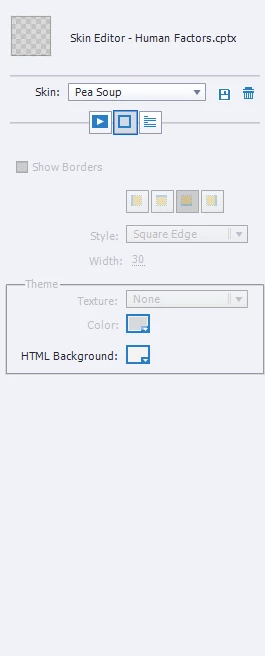
I am trying to put a border around by project but when I navigate to the skin editor and click on the border option.  The click box is faded out.

I have searched the forum and messed around in captivate, but can't find the issue.

Someone help please
    This topic has been closed for replies.
    Correct answer RodWard

    Are you building a Responsive Project?  If so, that will be the reason.

    4 replies

    bolanabolana
    Known Participant
    September 9, 2016

    Hi

    Thanks for this thread, it has helped me out

    This is really annoying. So the thing that really bugs me with this is that it is fixed with one border (bottom) on, why is this. Give us no borders or the ability to add/remove at will.

    So at the moment I'm dealing with this by changing the html background to match, it is C0C0C0 in case anyone else was wondering

    Thanks

    Participant
    July 1, 2016

    Thanks...that is the issue.

    Lilybiri
    Legend
    July 1, 2016

    Setup of skin editor is different when you work with a responsive project in 8/9: the playbar is unchecked by default whereas it is checked by default for a normal project. Moreover there is no way, even when you choose to have a playbar, to have borders. That option will always be greyed out. You can mimick the borders by putting them on the main master slide (use a shape with a fill of 0% and height/width size set to 100%). You will have to check if it gives the wanted result on all devices however.

    RodWard
    Community Expert
    RodWardCommunity ExpertCorrect answer
    Community Expert
    July 1, 2016

    Are you building a Responsive Project?  If so, that will be the reason.