
TaylorJumbo
Participating Frequently
January 23, 2020
Question

Skin editor questions

  • January 23, 2020
  • 2 replies
  • 245 views

Sorry for the simple questions but it's been several years since I've worked with Captivate and I guess I'm a noob again.


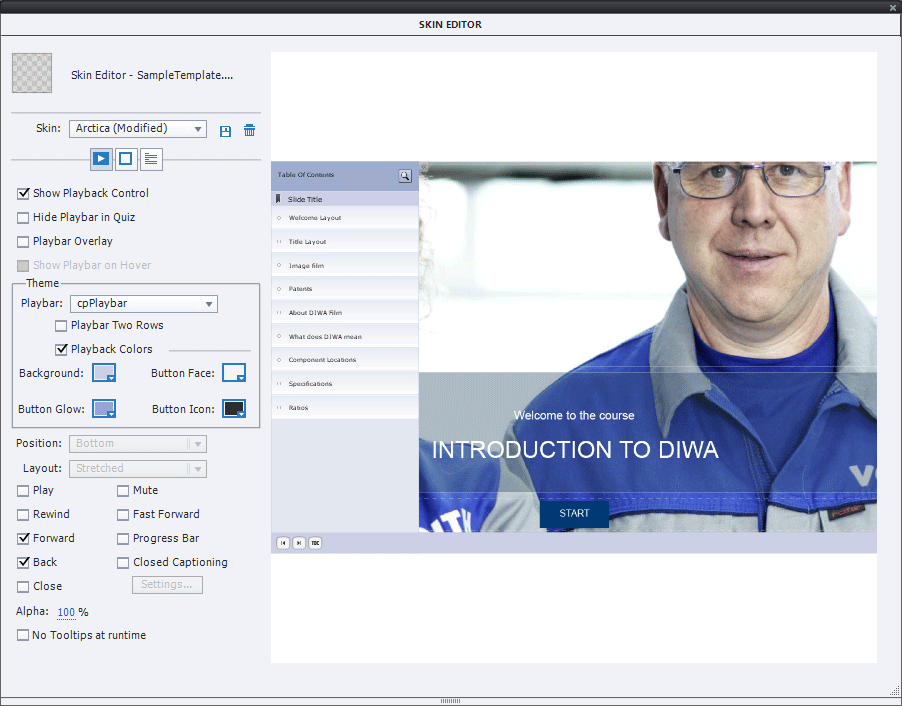
That said......Can the TOC be removed from the Navigation bar?  I can't seem to find a toggle for this.  


And why is the position window greyed out for this layout?  I want the buttons to be moved to the far right but can't figure out how this is done.


This topic has been closed for replies.

2 replies

Lilybiri
Legend
January 23, 2020

All your questions are linked with the fact that you are working with a Fluid Boxes project. That is the reason that you have Position Properties greyed out, that the TOC is always in Overlay (cannot be separate) and that the TOC button is needed in the playbar because of that Overlay.

RodWard
Community Expert
Community Expert
January 23, 2020

Your screenshot of the dialog shows that you are currently looking at the settings for the Playbar, not the TOC.  Click the small button at the right of those three that are just under the Skin dropdown list.  That will take you to the TOC settings and from there you can disable the TOC.


Is this a Responsive Project?