

songpondomethong
Participating Frequently
October 16, 2019
Question

Skin on published HTML is not the same as setting

  • October 16, 2019
  • 2 replies
  • 212 views

Hi, there


I have created the file in Captivate 9 and set up the skin for video file as "haloSkin1" as per below screenshot. Everthing is fine on previewing mode as expected. But the skin disappears when I published in HTML version. I try to replace the video file or remove and re-import the video file but the result is still the same.  
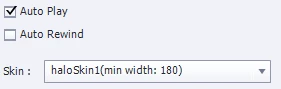
 

My set up skin on video file

My set up skin appears on previewing mode as expected

My published HTML

    This topic has been closed for replies.

    2 replies

    Inspiring
    October 16, 2019

    The video skins you find on the event video's Properies tab are legacy Flash skins and would not work on HTML5 output. Chances are you used one of the Flash based preview methods to preview. However, unless you selected 'None' in the Skin selector, some generic playbar should display in the HTML5 output when you mouseover the video. Is this not the case?

    Lilybiri
    Legend
    October 16, 2019

    I'm sorry but for event video in HTML output changes to that skin will not apply.