

Slide not advancing at end of timeline
Have a problem that I just cannot figure out. At the end of the slide timeline, the project stops.
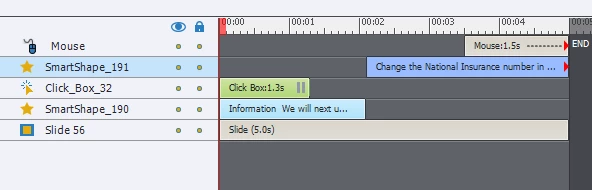
The structure of the slide is a text box with some instruction and a directive to click anywhere to continue (smart shape 190). There is a 1.3 sec click box over the entire screen with a pause (click box 32). On click, the timeline resumes and the click box disappears. The text box disappears and a new text box appears (smart shape 191), along with the mouse action.
The problem is that at the end of the slide the timeline stops and will not advance - cannot figure out what is stopping the advance. This setup is used elsewhere in the project without issue, and the settings on this slide appear to be the same as the other slides.
I inherited this capture and am not sure if the SME is still available so really need to make this work.
Any help much appreciated.
Using Captivate 8.


 AdChoices