Participating Frequently
March 14, 2023
Answered

slide not continuing and user has to click next to continue

  • March 14, 2023
  • 2 replies
  • 894 views

Hi,


 I’m having an issue on my slides, I have added a 'next' button for users to click to continue to the next slide, my manager is wanting this to be taken out. I have a voice over on pretty much every slide and instead of it continuing to the next slide it’s automatically stopping unless I use the play bar along the bottom to continue or the user clicks the next button I have created, is there a reason for this also, am I missing something?


Thank you,

Meghan


    This topic has been closed for replies.
    Correct answer RodWard

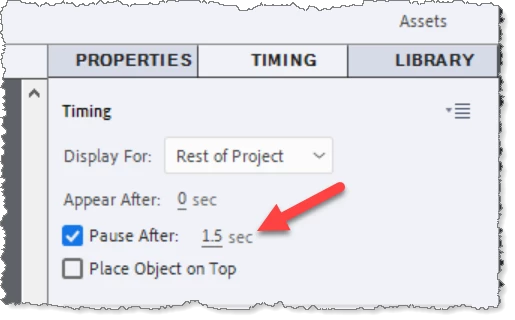
    Your screenshot shows that you have two buttons on that slide both of which have pausing set for 1.5 seconds after the start of the slide.  If you want the timeline to continue to the next slide without pausing, select each of those buttons in the Timing tab uncheck the Pause After option,

    2 replies

    Community Expert
    March 15, 2023

    Check your timeline, there must be a button in the timeline that is pausing the movie. Or you can also check the properties panel under Actions and make sure there is nothing set to Pause.

    Hope that helps!
    Mark

    headTrix, Inc. | Adobe Certified Training & Consulting
    Lilybiri
    Legend
    March 14, 2023

    To give you a valid answer without guessing I would like to see a screenshot of the Timeline of that slide, and the Properties, Actions tab for the slide.

    My guesses: you have a pausing point somewhere, or you have the On Exit action for the slide set to 'Pause'.

    Participating Frequently
    March 15, 2023

    Hi, 

    I have added a screenshot of my timeline.

    I've checked my properties and my on exit is set to 'no action' I removed the next button and changed it to 'go to next slide' but it still paused and  I think the slide is pausing because I have a previous button also on the slide.

    Hope this helps!


    Participating Frequently
    March 15, 2023

    sorry forgot to add the properties screenshot as well