Known Participant
February 12, 2014
Answered

Slide not pausing for the "Next" button. All other slides work fine, what am I missing?

  • February 12, 2014
  • 1 reply
  • 1108 views

Hi,

I am creating training modules that require the learner to click NEXT to advance to the next slide.  Within a slide, there might be transitions within that topic, but I want the learner to have to click to get to the next major topic (slide).  This works fine for all other slides, except for the one shown below...

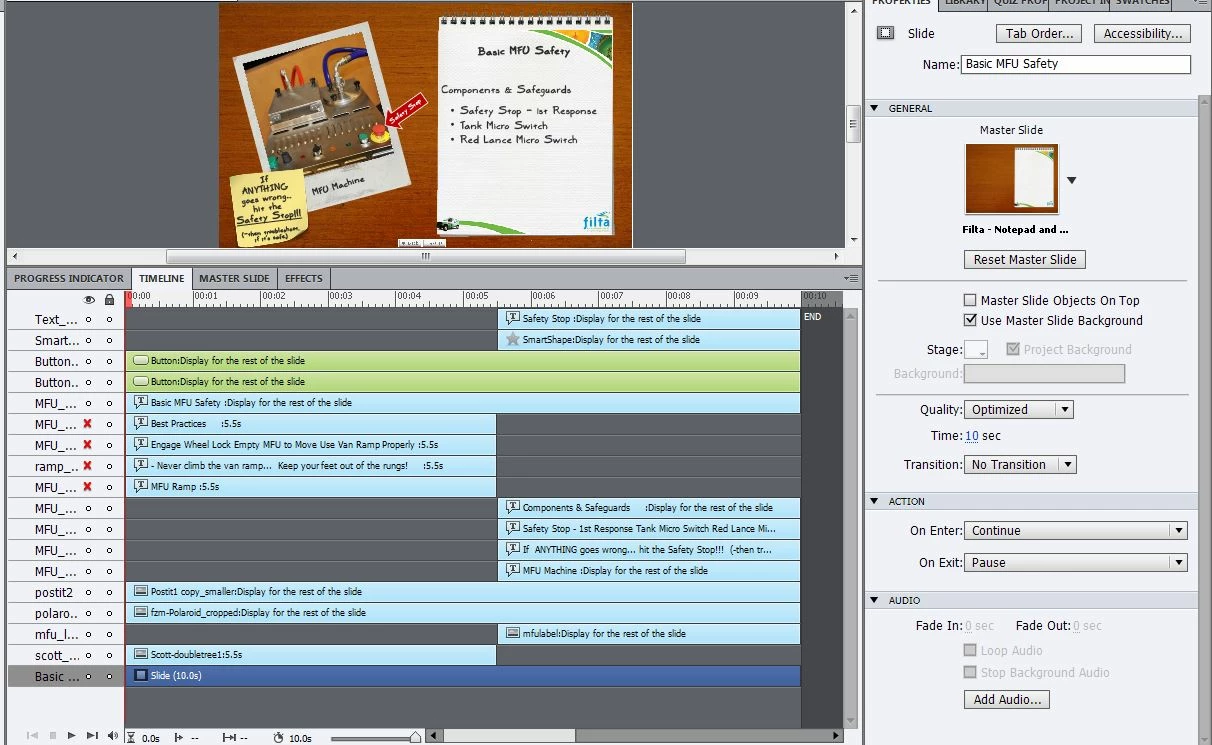
I am betting that the solution to this will be obvious to at least one of you.  Hopefully my screenshot will show what I am not doing correctly. 

For all other slides, I have the Slide Action "Continue" on Enter (to advance the timeline) and "Pause" on Exit, to make the NEXT button do the work.  The other ones seem to work fine, but this one is giving me problems.  Any thoughts?
This topic has been closed for replies.
Correct answer Lilybiri

Which version are you  using? None of the buttons on this slide is pausing that slide. Adding the action Pause On Exit in CP7 (and 6) is not the way to go: this action is executed when the playhead has left the last frame, so pause will occur on the first frame of the next slide. I'm puzzled that you say this is working on some slides? Sure that you don't have a pausing on the Next button, which is the normal way to pause a slide. Then there is also no reason whatsoever to make that slide that long. You can pause that button at 1 sec and decrease the slide duration to 7secs, throw away all those unneeded frames that only increase filesize.

Lilybiri

1 reply

Lilybiri
LilybiriCorrect answer
Legend
February 12, 2014

Which version are you  using? None of the buttons on this slide is pausing that slide. Adding the action Pause On Exit in CP7 (and 6) is not the way to go: this action is executed when the playhead has left the last frame, so pause will occur on the first frame of the next slide. I'm puzzled that you say this is working on some slides? Sure that you don't have a pausing on the Next button, which is the normal way to pause a slide. Then there is also no reason whatsoever to make that slide that long. You can pause that button at 1 sec and decrease the slide duration to 7secs, throw away all those unneeded frames that only increase filesize.

Lilybiri

Known Participant
February 12, 2014

I'm using Captivate 7.  I marked this correct -- but can you please confirm that I did this correctly? 

Eventually, these slides will have voiceover audio.  Once that happens, will the slide not be the length of the audio?   (Either way, I shortened the time on the first transition so it would all fit in the view - so you could see everything at once.  I will need to give them long enough to read each set of bullets...

(I have only been doing this since January -- trying to put together training modules for my company, and we just got Captivate.  Thanks for your help and patience.  I'm trying to learn this as quickly as I can - while getting these put together.  Thanks to you all for your help!)

Lilybiri
Legend
February 12, 2014

Should have asked about audio clip. Indeed, if you have an audio clip the slide duration will be increased depending on its length. Since I didn't see an audio clip forgot. It is better to synchronize the objects after you have the audio clip, I see that you staggered timelines, maybe that will have to be changed. And it is possible that you'll have to change the pausing on that Next button as well. You can also drag it on the timeline instead of setting in the Timing accordion. Is this the Next button that you gave a pause? You can give it an On Success action (Actions accordion is not visible in your screenshot) 'Go to Next Slide'. If the user clicks on that Next button, in the active part of its timeline (which is before the pause), he will get immediately to the next slide. That means that all the frames in the inactive part are never used. That is why I told you, it should be possible to shorten the slide duration. Because you need to add a VO, better wait to make other changes until you know its duration. And you don't need to use the On Exit action anymore, get rid of it. You don't need to change the On Enter, nor the On Exit action of each slide.

If you are on 7, did you install the update? Present version is 7.0.1.237.

Lilybiri