
Inspiring
May 31, 2016
Question

Slide Notes Buttons Revisited

  • May 31, 2016
  • 1 reply
  • 286 views

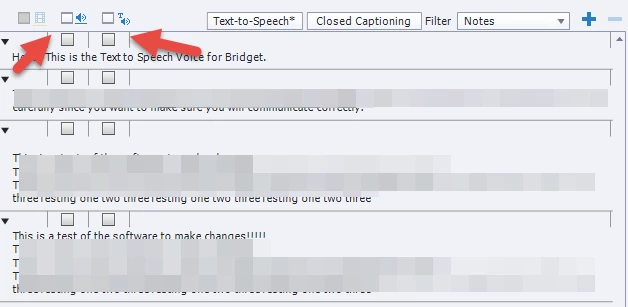
Can someone please tell me why the TTS, Audio CC and Video CC buttons are there? Logically, I would assume they are there because they have to be selected in order to work. However, I have yet to see these buttons work since the  Text To Speech still works when I don't select the TTS button. In other words, I see not use for them.

Perhaps I am missing something. After all,I have yet to  use Audio CC. Is the Video CC for exporting video?

I asked this question weeks ago but I am still not satisfied with my knowledge on these buttons.
Thanks again for your help.
This topic has been closed for replies.

1 reply

Lilybiri
Legend
May 31, 2016

I will try to give an example which I just demonstrated last week in a training.

Suppose you want to have TTS for English audio clips, but to show CC in another language (I used Dutch). In that case I will add both slide notes for English and for Dutch. The checkboxes are useful to mark only the English notes for TTS, and the Dutch notes for CC. You do not have to use the same notes for TTS and CC. The check boxes give you the opportunity to exclude/include for one of the two options.

The video CC will only appear if you have video, and allows to create CC for video audio.

clworkAuthor
Inspiring
May 31, 2016

Thank you Lilybiri,

Let me try out your suggestions.

Thank you.