September 6, 2010
Question

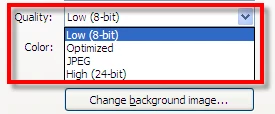
Slide Properties > Quality

  • September 6, 2010
  • 2 replies
  • 836 views

Captivate v4

Can anyone explain in simple terms (please) what the main differences are between the "Quality" options found on Captivate 4 slide properties and is one of the settings recommended to use as the "default" setting, and if so, which one ?
Noel

This topic has been closed for replies.

2 replies

Captiv8r
Legend
September 6, 2010

Hi Noel

Probably only one of the Captivate team can say with any real authority what actually goes on when you change it. I might imagine things such as the actual image format or the color depth change as a result. I did create a small demo that has only four slides on it using the same image in order to show what the same image looks like at the four qualities.

Click here to view the demo

I might also imagine that Slide Quality is like anything else. What I mean by this is that there is probably a trade off that will occur. In order to use less space, you store less data. The slide image fidelity is sacrificed in order to save space. Or if you really need a high quality image, you sacrifice space to store the additional data.

My usual method of operating is to leave the setting as is, unless I notice degradation of quality and choose to improve by adjusting the setting.

Cheers... Rick

Helpful and Handy Links

Begin learning Captivate 5 moments from now! $29.95

Captivate Wish Form/Bug Reporting Form

Adobe Certified Captivate Training

SorcererStone Blog

Captivate eBooks

Captiv8r
Legend
September 6, 2010

Sorry Lieve. You sneaked in as I was formulating my post.


Lilybiri
Legend
September 6, 2010

Hi Rick,

Telepathy is not working? No problem, nice for the user to have multiple answers

Lilybiri

Lilybiri
Legend
September 6, 2010

Hi Noel,

Did you read this blog post?

http://blogs.adobe.com/captivate/2010/07/balancing-image-quality-and-swf-output-size-in-cp-5-2.html

Default setting is Low 8-bit. That can be fine for captures but you have to know that 8-bit means that every object's colors are limited to 256 (2^8 for math lovers). A typical graphic format in 8-bit is GIF. For simple graphics and drawings that is OK, but if you do use something like a photo it is absolutely insuffcient. High Qualitiy is 24-bit, has 16777316 colors (2^24).  JPEG can show the same number of colors but is a lossy graphic format, which means some graphic information is lost. JPEG comes in different qualities (12 is highest quality, highest number). And I'm really not sure how Optimized is working in CP, sorry.

How do I choose myself: slides where quality is important, I do set them to High, after previewing. If quality is more important then filesize, I choose High (or Optimized) for all slides. If filesize is imporant too I only do this where necessary. For some reason I rarely use JPEG, but this that is personal, will never use JPEG to optimize a photo for web neither (always use PNG). Cannot give you a scientific reason.

Lilybiri