Participant
June 30, 2017
Question

Slide transitions

  • June 30, 2017
  • 4 replies
  • 4077 views

Hi ,

I am using Captivate 2017 (10.0.0.192) and am trying to apply a slide transitions (for the entire slide, not content or objects on the slide).

This webpage provides simple instructions to do this, however I cannot see the transition list.

I have a slide selected from the filmstrip and these are my options.
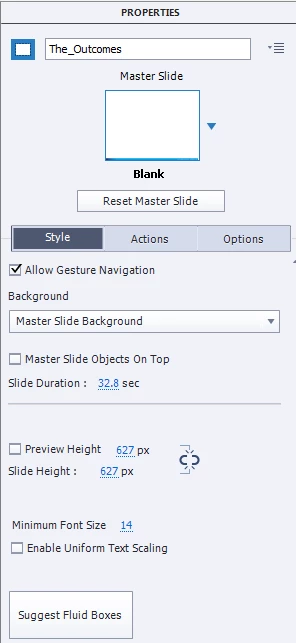
Appreciate any advice.

Thanks,

Jayne.

This topic has been closed for replies.

4 replies

Participating Frequently
April 25, 2023

I just started using Captivate 2019 and discovered that there isn't an option for slide transition!  But I discovered that there is a still an option to fade in and out for objects.  So I'm adding white squares over my slides and then using the fade out option.  When published, the visual experience is the same as using slide transition.  The only downside is that you can't see the actual slide in the source file after you add the shape over it. My plan is to do that last, right before I publish.

Participant
July 27, 2018

Yes you can. You have to select your slide then press on "Timing" (next to properties top right) then select from the drop down options. There doesn't seem to be any control of the length of the transition eg I wanted my fade to be 5 seconds but I can't seem to control that anywhere.

Moderator: you cannot use slide transitions in any responsive project or in a non-responsive project published to HTML. Check the HTML Tracker

The info in this answer is irrelevant, only valid for SWF output.

Lilybiri
Legend
July 27, 2018

Sorry, you give wrong information Slide transitions are NOT supported for HTML output. Responsive projects are always HTML.

danibo83
Participating Frequently
March 28, 2019

If you have slide transitions in your non-responsive project and save it as a responsive project you keep the slide transitions. However, there is no way to change or disable them when working in the resp-project.

Lilybiri
Legend
June 30, 2017

You are working on a responsive project, which doesn't support slide transitions.  Was that tutorial for a normal project?

Inspiring
June 30, 2017

Slide transitions are a SWF (shockwave flash) animation. As such, they are not available for responsive design projects due to being exclusively HTML5 format. I suggest looking into HTML5 animations and using object effect animations to try and mimic what you want your slides to do. Be sure to go to Project -> HTML5 tracker to see if there is any SWF conflict.