
Inspiring
September 6, 2016
Question

Slide works fine in .swf but not in HTML5

  • September 6, 2016
  • 1 reply
  • 489 views

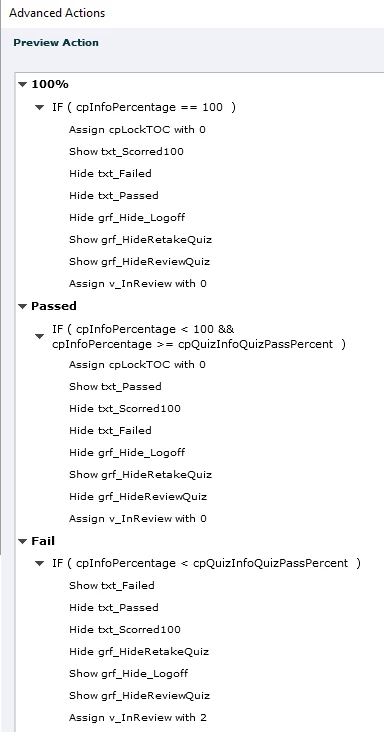
We customized the RESULTS slide to accommodate three score conditions:

1. The learner scores 100%

2. The learner passes the quiz with less than 100%

3. The learner does not pass the quiz

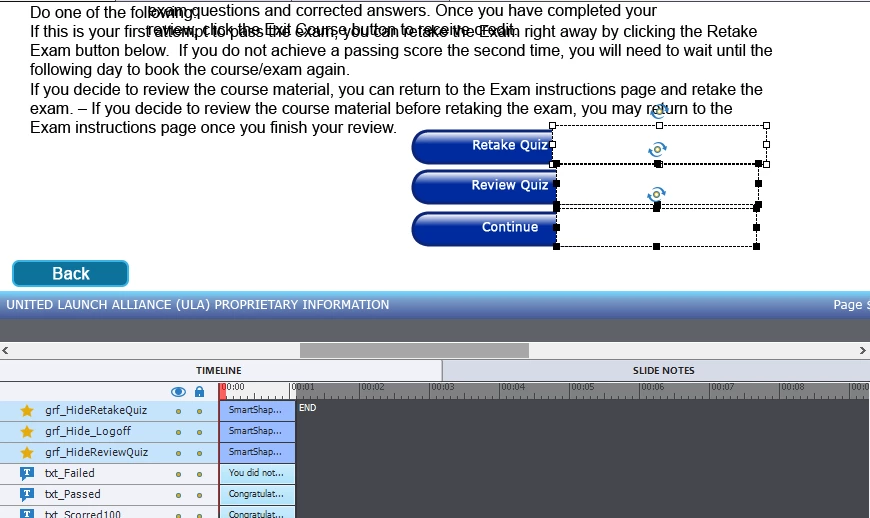
The image shows the basic layout of the screen objects, specifically the buttons and masks (the masks have been offset for clarity)
The On Entry Advanced Action of this slide looks as shown
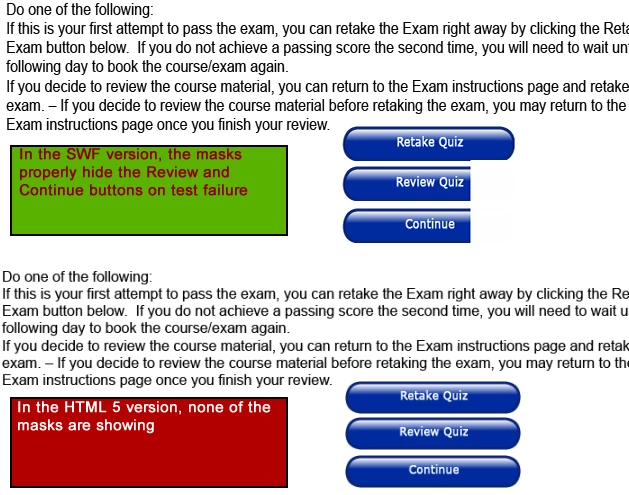
The logic works for 100% and Passed in all versions. The Fail condition works fine in the .swf version but not in html as shown
We have looked over this for days, set the arrangement(s) so the buttons are "Send to Back" and the Masks are "Send to Front".

What are we missing?

This topic has been closed for replies.

1 reply

RodWard
Community Expert
Community Expert
September 6, 2016

Why are you trying to hide the buttons this way with masks?

The Retake Quiz button will disappear on its own when the learner achieves a passing score.

You can hide the Quiz Review button underneath the Retake Quiz button.  This makes more sense because the moment the learner DOES click Review Quiz they won't be able to make any more attempts on the quiz in that session anyway.  So reviewing the quiz is really only something you want them to be able to do AFTER they've exhausted a reasonable number of attempts.

It's quite common for some things to NOT work the same in SWF and HTML5.  In your case the masks in HTML5 are probably showing up BEHIND the buttons.  You can check this by changing the colour of the masks and see if that makes them visible.

If it turns out that in HTML5 the mask objects are not showing up at all (regardless of colour) then this is probably a bug in Captivate's HTML5 output and you should report it.

However you don't state which version of Captivate you are using.  If it's not the very latest version, updating your Cp version would be something that you could also try (even if it's only installing the trial version).

Lilybiri
Legend
September 6, 2016

Something Rod didn't mention, but which happens for HTML output: it is not always sufficient to 'show' or 'hide' a (shape) button, you also have to 'enable' 'disable', and HTML output is more sensitive to it.

Totally agree with Rod that you are making it too complicated, try to understand/use the design of the score slide before using 'masks'. Covering interactive objects with static objects will prevent interactivity in HTML output mostly but not in SWF output. Maybe you could find some tweaking information in these blog posts:

Question Question Slides in Captivate - Captivate blog

Question Question Slides - Part 2 - Captivate blog