samamara
Known Participant
April 9, 2021
Answered

Slowdown Slide Playback (with .swf file)

Hi all 🙂


I have a slide in a simulation that recorded me scrolling down the screen and it recorded as such on the timeline: 
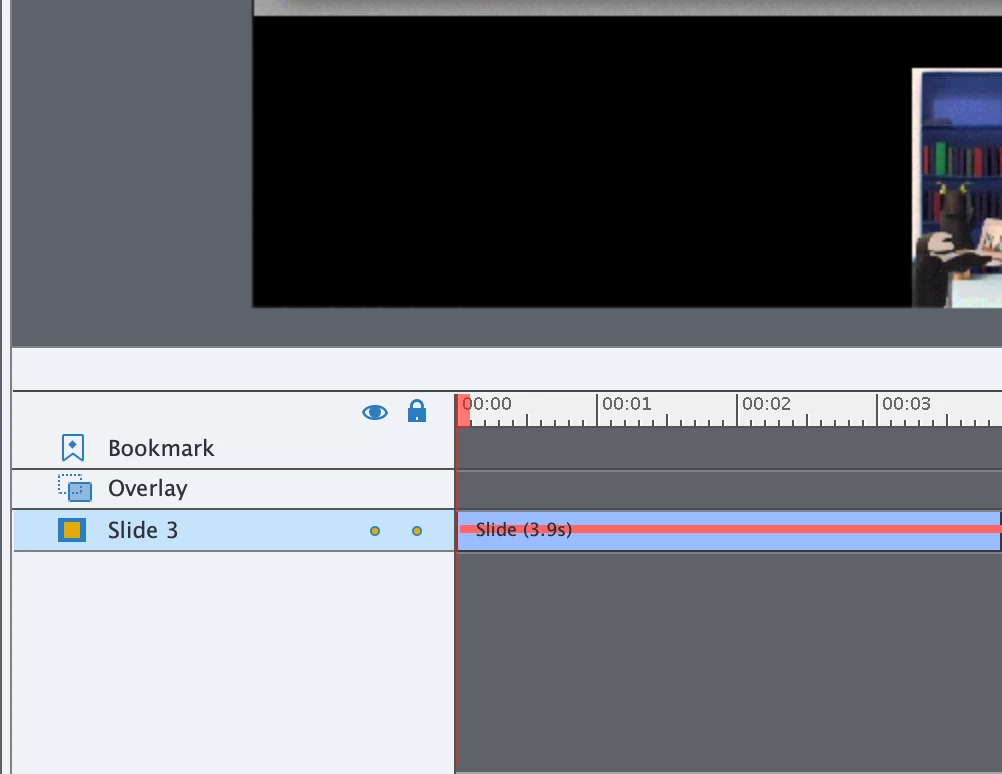


Is there any way in Captivate to make it so when the user goes through the simulation it doesn't scroll as quickly? It's about 4 seconds now but I'd like to increase it to about 7. I think I could probably create a video of the scroll and then import it into the project, but is there a way to do this inside of Captivate?


Thanks in advance 🙂



    This topic is closed to new replies. Start a new post to keep the conversation going.
    Lilybiri
    LilybiriCorrect answer
    Legend
    April 9, 2021

    It is a FMR slide.  Since you want to replace it, I would recommend to insert a Video Demo slide. Reason: no conversion from SWF to MP4 will be necessary (it sometimes goes wrong) and the quality will be better.

    Use this workflow:

    • Set up the application to capture in the correct situation.
    • In Captivate select the slide before the new slide
    • Use the big button Slides, Video Demo
    • Record and try to be slow enough
    • After ending the capture you'll have cpvc-slide and the Video Demo Editor can be used on this slide; it has a lot more functionality than the FMR slides.

    3 replies

    Lilybiri
    LilybiriCorrect answer
    Legend
    April 9, 2021

    It is a FMR slide.  Since you want to replace it, I would recommend to insert a Video Demo slide. Reason: no conversion from SWF to MP4 will be necessary (it sometimes goes wrong) and the quality will be better.

    Use this workflow:

    • Set up the application to capture in the correct situation.
    • In Captivate select the slide before the new slide
    • Use the big button Slides, Video Demo
    • Record and try to be slow enough
    • After ending the capture you'll have cpvc-slide and the Video Demo Editor can be used on this slide; it has a lot more functionality than the FMR slides.
    Translate
    samamara
    samamaraAuthor
    Known Participant
    April 9, 2021

    Thanks Lilibiri; 


    I was hoping I wouldn't have to replace it but it does make sense to do it that way and ensure better quality. 


    Thanks!

    Translate
    Lilybiri
    Legend
    April 9, 2021

    You're welcome! Editing that slide (in a video application) would not even guarantee that the FMR was converted as expected when published. This workflow doesn't suffer from that.

    Translate