

Smart Shape Buttons - Always pauses or unpauses timeline.
Hey all!
I'm using smart shapes as buttons in my project to trigger "pop ups" on slides, but I'm running into unintended effects with the timeline. I noticed the following check box:
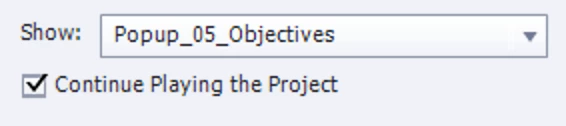
My assumption was that it would work like this:
Continue playing the project unchecked: Clicking this button will pause the timeline
Continue playing the project checked: Clicking this button will not interact with the timeline in any way
This makes sense although a little counter intuitive, but what actually happens seems to be even moreso:
Continue playing the project unchecked: Clicking this button always pauses the timeline
Continue playing the project checked: Clicking this button always unpauses the timeline
Therefore, there seems to be no way to make a smart shape button simply NOT interact with the timeline. No matter what options are chosen, it will always either pause or unpause the timeline.
This isn't acceptable for me. I don't want the timeline to be paused when this button is clicked, but if I leave the Continue playing option checked, I run into the issue where if the learner waits until the end of the slide where it automatically pauses On Exit, clicking this button will resume the timeline, thus jumping to the next slide before they are ready.
I'm a heavy javascript user, but no amount of custom code seems to be able to get around this, since it appears to be built in functionality. Am I crazy? Am I overlooking something obvious? Any help would be appreciated.


 AdChoices