Known Participant
November 21, 2013
Answered

Smart Shape Execute Advance action Captivate7

  • November 21, 2013
  • 1 reply
  • 396 views

Hi,

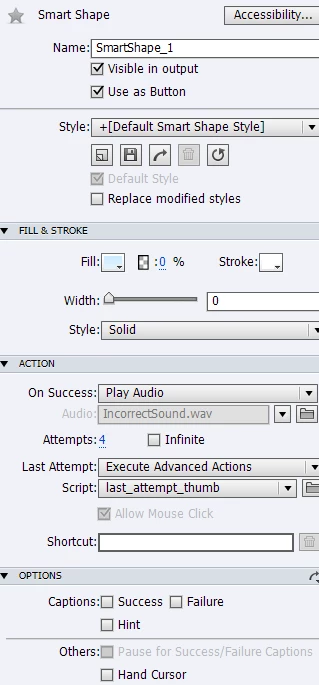
I need to allow students to click on a smart shape for only four times and each time play an audio for them, then in the last attempt, show them an image(which is invisible) + with another set of audio.

Please see the attached image.

Apparently Captivate does not support this.

Is there any solution for it?

Thanks,
This topic has been closed for replies.
Correct answer RodWard

You can build this interaction using a custom user variable to track the number of times the user has clicked the Smart Shape and a Conditional Action that checks the user variable before playing the audio. 

It would look like this:

IF MyClickCountVariable is less than 3

THEN

Play first audio file

Increment MyClickCountVariable  (or if you are not on Cp7 you could use Expression: MyClickCountVariable = MyClickCountVariable + 1 to increment)

ELSE

Play other audio file

Show image

So as when the user clicks the button for the first two times it will play the audio and increment the counter, On the third try it will play a different audio file and show the image but not increment the variable.

1 reply

RodWard
Community Expert
RodWardCommunity ExpertCorrect answer
Community Expert
November 21, 2013

You can build this interaction using a custom user variable to track the number of times the user has clicked the Smart Shape and a Conditional Action that checks the user variable before playing the audio. 

It would look like this:

IF MyClickCountVariable is less than 3

THEN

Play first audio file

Increment MyClickCountVariable  (or if you are not on Cp7 you could use Expression: MyClickCountVariable = MyClickCountVariable + 1 to increment)

ELSE

Play other audio file

Show image

So as when the user clicks the button for the first two times it will play the audio and increment the counter, On the third try it will play a different audio file and show the image but not increment the variable.

Shirin_BAuthor
Known Participant
November 21, 2013

Thanks RodWard