December 21, 2016
Answered

Smart Shape Sizing Question

  • December 21, 2016
  • 2 replies
  • 188 views

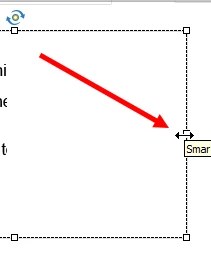
I grabbed a hold of the sizing handle on the right side of my smart shape and then when I tried to reduce the size of the right side of the shape, the entire shape moved and sized itself as well. Not just the right side.  I just wanted the right side to move.

Why does this happen? I just wanted to reduce my right side, not all the other sides. (see graphic)
    This topic has been closed for replies.
    Correct answer DrPooja

    Are you working on a responsive project? Chances are that the height of the shape is set to Auto and width to %. Change the height to %, and you will be able to resize just the width of the shape. Once resized, you can set the height back to Auto, if required.

    Let me know if this helps!

    2 replies

    DrPooja
    DrPoojaCorrect answer
    Participating Frequently
    December 22, 2016

    Are you working on a responsive project? Chances are that the height of the shape is set to Auto and width to %. Change the height to %, and you will be able to resize just the width of the shape. Once resized, you can set the height back to Auto, if required.

    Let me know if this helps!

    Lilybiri
    Legend
    December 21, 2016

    Can you try again, you show the correct handles, maybe you moved the cursor a little bit and got the move cursor?

    Is this a responsive or a normal project?