Answered
Smart Shapes corner radius
In Captivat 5.5 it was possible to change the corner radius of a rectangle.
In Captivate 6 is it possible to change the corner radius of a smart shape rectangle or round corner rectangle?

In Captivat 5.5 it was possible to change the corner radius of a rectangle.
In Captivate 6 is it possible to change the corner radius of a smart shape rectangle or round corner rectangle?
Hello Jay,
You cannot change it for the rectangle, but for the rounded rectangle you'll have to drag the small yellow handle to change the corner radius. I regret that it is no longer possible to type in a number for that radius (asked for it, not listened to) but you can edit with the mouse.
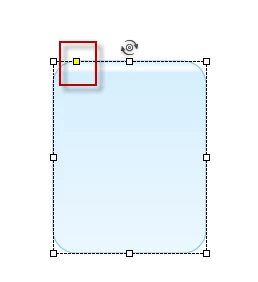
BTW: those yellow handles do appear on a lot of shapes and always are meant to change the look. If you want more editing you can convert each shape to Freeform shape and move the handles as well as the tangent points to create nice Bezier curves. Not every editing functionality is there like in Illustrator/Photoshop.... (asked for a full Pen functionality but rejected feature request) but it is a start. Perhaps I should create some video on YouTube (did you know I started creating them?)
Lilybiri
Already have an account? Login
Enter your E-mail address. We'll send you an e-mail with instructions to reset your password.
 AdChoices