Known Participant
June 30, 2014
Answered

Smart Shapes Cp8

  • June 30, 2014
  • 1 reply
  • 222 views

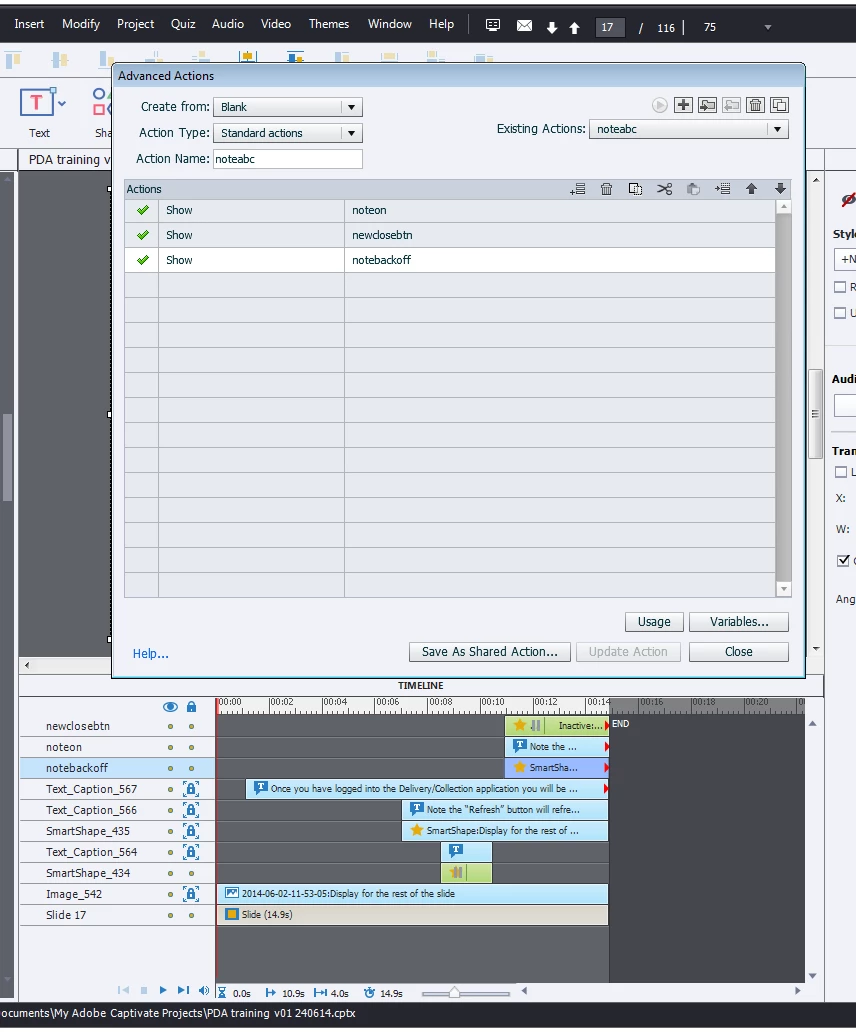
Hello All I have a number of smart shapes on my slide. I have used a couple of these as btns and to execute advance actions. The advance action is as image below. I't not sure why this is not working. Is it something to do with my timeline?  

    This topic has been closed for replies.
    Correct answer Lilybiri

    I think (because they are not labeled), that the shape button  ..._434 is triggering this action? It is pausing before the objects that you want to show appear. I don't understand why you stagger them this since you want to show them by an advanced action that seems a bit weird. If you want to keep ti that way, you have to add Continue to the advanced action, so that the play head will continue beyond the pausing point of that button, after having gone through its inactive region, it will reach the start of the timelines of the three objects and they'll become visible. They will not get visible when the button is clicked, due to your staggering on the timeline. Then the playhead will again stop at the timeline of the upper most shape button.

    I think it would be good first to try to understand the timeline: Tiny Timeline Tidbits - Captivate blog
    1 reply

    Lilybiri
    LilybiriCorrect answer
    Legend
    June 30, 2014

    I think (because they are not labeled), that the shape button  ..._434 is triggering this action? It is pausing before the objects that you want to show appear. I don't understand why you stagger them this since you want to show them by an advanced action that seems a bit weird. If you want to keep ti that way, you have to add Continue to the advanced action, so that the play head will continue beyond the pausing point of that button, after having gone through its inactive region, it will reach the start of the timelines of the three objects and they'll become visible. They will not get visible when the button is clicked, due to your staggering on the timeline. Then the playhead will again stop at the timeline of the upper most shape button.

    I think it would be good first to try to understand the timeline: Tiny Timeline Tidbits - Captivate blog

    MArif2014Author
    Known Participant
    June 30, 2014

    Actual I don't want it to stagger I decided to some interactivity so when the user clicks the dialogue and shapes would appear. How do I amend this when the user clicks the btn the shapes become visible. I tried turning off the "visible on output" but still didn't work. I suppose your comment on staggering would explain this, but say if I placed the items at the start of the timeline and have "visible on output" turn on this should work?

    Lilybiri
    Legend
    June 30, 2014

    Do one of both:

    1. Let the objects staggered and visible, drag their timelines (or use the Timeline properties) so that they start exactly at the pausing point of that first shape button. No need for the advanced action in that case, just put the simple action 'Continue'.µ
    2. Leave the objects from the beginning of the timeline (you can make the slide duration shorter in that case), make the objects invisible (use the eye icon on the Properties panel), use the advanced action, but add the statement Continue. Be sure to have the pausing point of the second shape button bit later than that of the frist .._464