
Participating Frequently
August 9, 2016
Question

Smartshape button states not working when exported via HTML5

  • August 9, 2016
  • 1 reply
  • 217 views

Hi everyone,

I technically have two questions, but the one in the title is my main question.

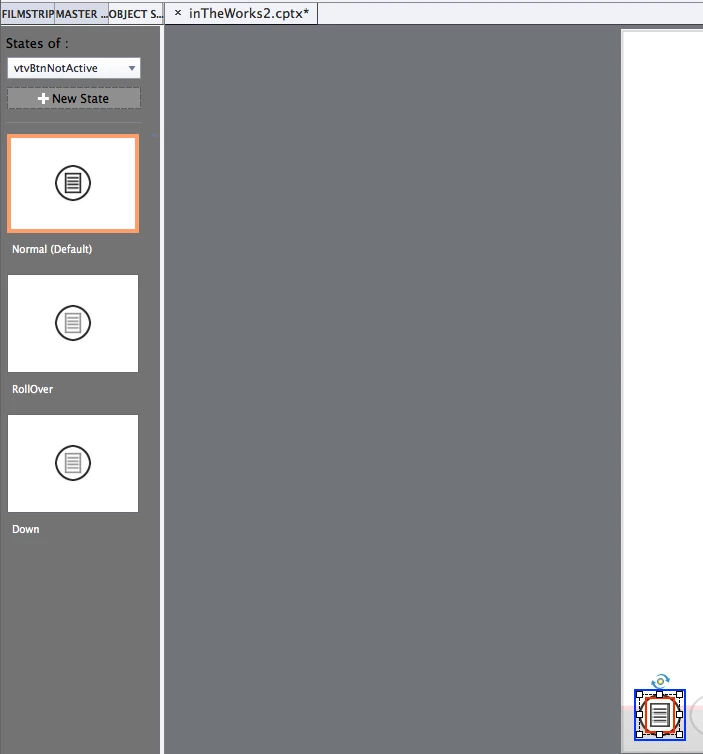
I am planning on creating my own navigation inside my module that will ultimately hold my screen simulations. I decided to use Smartshapes with SVG icons over the top of them, so they are easy to adjust and keep file size down. When I export HTML5 my smartshape buttons, which has 3 different states, don't react to the actions. The advanced actions that are set to them function perfectly fine, but the hover and down states are not working.

My second issue, that is not represented in the title, is when I have these smartshape buttons, I am using SVG's inside of State View to add the actual icon itself. When I preview or export to SWF and the States are working, they do not react when I hover over the actual SVG, which is what represents the icon. If anyone has a fix for this, I would highly appreciate it.
Thanks!

    This topic has been closed for replies.

    1 reply

    R_H__
    Inspiring
    August 10, 2016

    Was the button created by using a transparent Smartshape and selecting "Use as button"?

    If so, when we do that and paste an image into the three different state layers (Normal, RollOver and Down), we then have to select each image and send it to the furthest back layer. This allows the transparent smartshape layer to be hit and for the button to act as expected.

    Lilybiri
    Legend
    August 10, 2016

    @RH-86 You are correct when you want to use SVG's because they cannot be used as fill for a shape button. But for any bitmap image ((PNG, GIF, JPEG) it is easier to fill the shape button with an image in each state. It not only saves on number of objects but also on file size.

    @Jacob   Indeed, you cannot fill a shape button with a SVG which is such a serious limitation. I strongly recommend to log a feature request (as I did) to make it possible in a future release. Lot more would be possible with SVG's, which are indeed beneficial to file size and excellent for responsive projects. I want to add a tip: I often use a character from the Webdings or Wingdings fonts to replace an image in states. It can even lead to smaller file sizes than a SVG (not always the case). As RH-86 points out you need to use the Arrange command in the right-click menu in each state to send the SVG backwards to have the rollover and down states be functional. It doesn't have to be the furthest back layer, just behind the shape button is fine.