
Participating Frequently
March 28, 2017
Answered

SmartShape dimensions are not showing up under Options

  • March 28, 2017
  • 1 reply
  • 188 views

This has been driving me absolutely bonkers. I've googled all around, searched the forums, but it seems my key words aren't helping me.

I am not super pro at Captivate but I know enough to get me by. I know there's a way to set shapes to a specific height and width. It should be where the X/Y coordinates are, under Options, for the specific shape.

I grab a shape from the top, drag it onto my screen, make sure it's highlighted, go over to Options, and don't see anything. Not even an option for coordinates.
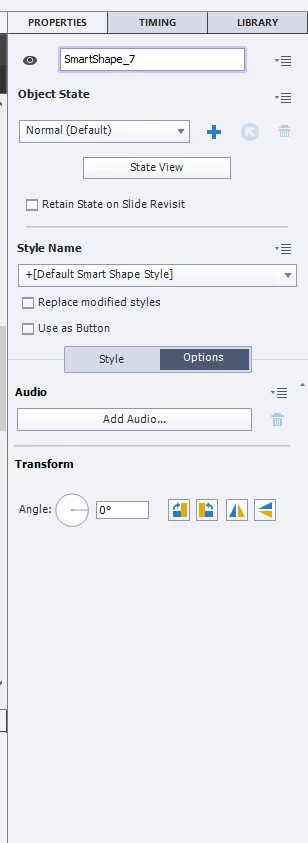
It's a responsive project - I figure that's relevant.

Please help, haha. I am attempting to redesign a Storyline module into Captivate using its awesome responsive features. But I am getting stuck at what should be super simple tasks.

Thanks!

    This topic has been closed for replies.
    Correct answer Lilybiri

    Responsive project? You need the Position Properties panel in that case. That UI change was supposed to make it easier, but I don't agree at all because of the lack of consistency:

    • In a normal project, the size and the location of objects is in the Properties panel, tab Options
    • In a responsive project, size and location of objects are in the Position Properties panel, which has no content in a normal project. The Options tab has no space for all those settings in a responsive project.

    1 reply

    Lilybiri
    LilybiriCorrect answer
    Legend
    March 28, 2017

    Responsive project? You need the Position Properties panel in that case. That UI change was supposed to make it easier, but I don't agree at all because of the lack of consistency:

    • In a normal project, the size and the location of objects is in the Properties panel, tab Options
    • In a responsive project, size and location of objects are in the Position Properties panel, which has no content in a normal project. The Options tab has no space for all those settings in a responsive project.
    Participating Frequently
    March 28, 2017

    Omgosh. I could seriously cry right now. I spent the morning googling and seeing screenshots of what I should be seeing. Even considered reinstalling, thinking my version was broken!

    Thanks so much. I found the panel. You rock.

    Lilybiri
    Legend
    March 28, 2017

    Don't lose time, just post the question on the forum...

    My personal tip: forget that limiting newbie UI. Switch to the Expert UI (4th option in Preferences, General Settings). Create a workspace for Responsive projects, where you open all the panels (floating or docked) that you'll need all the time. Same for quizzing and for normal projects. Letting Captivate decide what you 'may' see 'as is the case for the Newbie UI) is humiliating to me, applications shouldn't take decisions in my place.