Participating Frequently
November 1, 2015
Answered

smartshape form speichern

  • November 1, 2015
  • 1 reply
  • 335 views

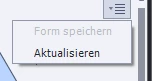
Es ist mir nicht möglich, eine SmartShape-Form zu speichern. Das entsprechende DropDown-Menü kann zwar geöffnet werden. Es erscheint auch die Auswahl (Form speichern/Aktualisieren). Aber es ist nicht möglich [Form speichern] durch Mausclick zu aktivieren.

Version 8.0.1.242 / Abonnement


    This topic has been closed for replies.
    Correct answer Lilybiri

    Sorry for an answer in English.

    Maybe there is some misunderstanding. I am able to 'Save a shape' which is the English equivalent of 'Form speichern' when I have changed the form of the shape. Mostly that happens after converting the shape to a freeform shape and editing the points. You'll see such a custom shape in the movie in this blog post, second slide: Custom Short Answer Question - Captivate blog

    'Save a shape' is not meant to save changes to fill or stroke for the shape, in that case you should save a shape style. Use the Object Style Manager, and save the shape style. Each shape style can even have the three states (including rollover and down) that are needed if the shape is used as a button.

    1 reply

    Lilybiri
    LilybiriCorrect answer
    Legend
    November 1, 2015

    Sorry for an answer in English.

    Maybe there is some misunderstanding. I am able to 'Save a shape' which is the English equivalent of 'Form speichern' when I have changed the form of the shape. Mostly that happens after converting the shape to a freeform shape and editing the points. You'll see such a custom shape in the movie in this blog post, second slide: Custom Short Answer Question - Captivate blog

    'Save a shape' is not meant to save changes to fill or stroke for the shape, in that case you should save a shape style. Use the Object Style Manager, and save the shape style. Each shape style can even have the three states (including rollover and down) that are needed if the shape is used as a button.

    hhviareteAuthor
    Participating Frequently
    November 2, 2015

    Many thanks. The fault was on my side. I forgot starting converting the shape to a freeform.

    Lilybiri
    Legend
    November 2, 2015

    Do not label it as 'fault', it was a misunderstanding.