


Participating Frequently
July 22, 2023
Answered

SmartShapes not showing in publish project

  • July 22, 2023
  • 3 replies
  • 232 views

I am doing a project for school and having issues with my SmartShapes. When I publish my project to HTML, they are not there. I published to video, and they are there. 


There are simple SmartShape. They are not buttons; no fancy work going on. I did have an Enternce effect applied at one point, but I have removed it. Now they come in later on the slide, according to the narration. I have arrows pointing to what I am talking about on the screen.


Example of the arrow.

 

Properties setting
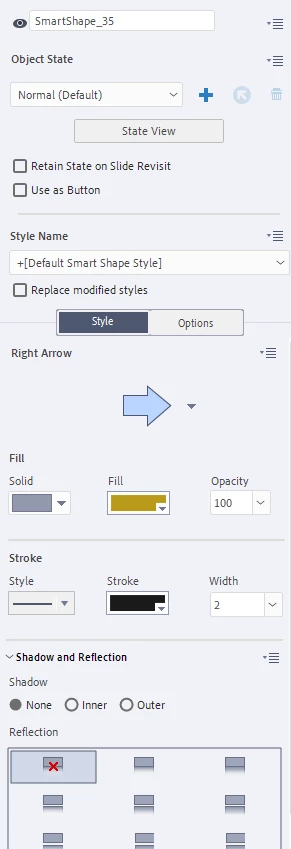


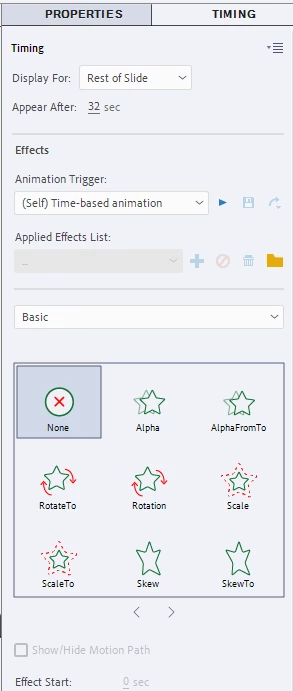
Timing
 

Here is my timeline - SmartShape_35 is the one in the above image.
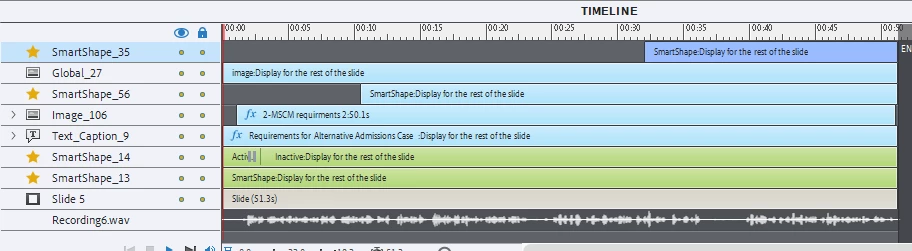
 

So as you can see very simple. I am using Chrome, and yes I have made sure it is updated. I even tried it in Edge and it did the same thing.  


Any ideas on why they are not showing up only when I publish it to an HTML5? 

Thanks

    This topic has been closed for replies.
    Correct answer Lilybiri

    Please take some time to read this blog post, explaining what happens when you insert an interactive object with a pausing point at the wrong frame:

    https://blog.lilybiri.com/pausing-captivates-timeline

    Not only the shape you indicated but also SmartShape_56 will never appear in an interactive project until the playhead is released (probably by clicking the button, not sure which action it is triggering). You are confused by the fact that the slide audio will continue to play, because you need to edit the Properties of that button to pause it when the button pauses the Timeline.

    You don't have that issue in a passive video because all interactivity is lost. Why would you publish to video if you use interactive objects is a mystery to me.

    3 replies

    KMclavy99Author
    Participating Frequently
    July 23, 2023

    Thank you both for your help. This gave me a starting point, and I could get my arrows while still having my buttons.

    This will be published as HTML5 as required for my school project.

    I did the video as a test run to see if they showed up there. I knew my buttons wouldn't work there, but it was more to see if the arrows were there. 


    Thank you again! I got my project work with what is required in it. 

    Lilybiri
    LilybiriCorrect answer
    Legend
    July 23, 2023

    Please take some time to read this blog post, explaining what happens when you insert an interactive object with a pausing point at the wrong frame:

    https://blog.lilybiri.com/pausing-captivates-timeline

    Not only the shape you indicated but also SmartShape_56 will never appear in an interactive project until the playhead is released (probably by clicking the button, not sure which action it is triggering). You are confused by the fact that the slide audio will continue to play, because you need to edit the Properties of that button to pause it when the button pauses the Timeline.

    You don't have that issue in a passive video because all interactivity is lost. Why would you publish to video if you use interactive objects is a mystery to me.

    RodWard
    Community Expert
    Community Expert
    July 23, 2023

    Your timeline screenshot shows Smartshape_14 has been set to be a button and is pausing the timeline about 2.5 seconds into playback.  That's why your objects are not appearing in HTML output.  MP4 video does not have interactivity.  That's why the same buttons DO appear when you publish to video.