
Inspiring
April 29, 2019
Answered

Some slides not playing back recording in Captivate 8

  • April 29, 2019
  • 1 reply
  • 471 views

This issue appears to be intermittent. I've had some slides not playback their recording when I preview or play project, and then PLAY the recording another time.

There are no objects (at least none I can find) that are pausing the project. The recording is set for the entire slide on the Options tab of Properties:
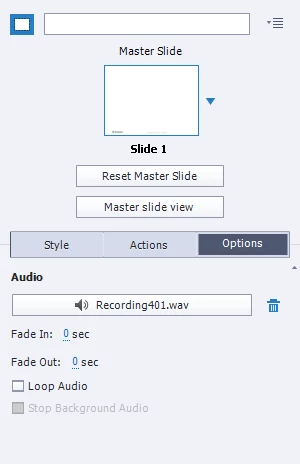
And the audio plays back just fine when I click the .Wav file in the properties.

The audio appears in the timeline, as I'd expect:
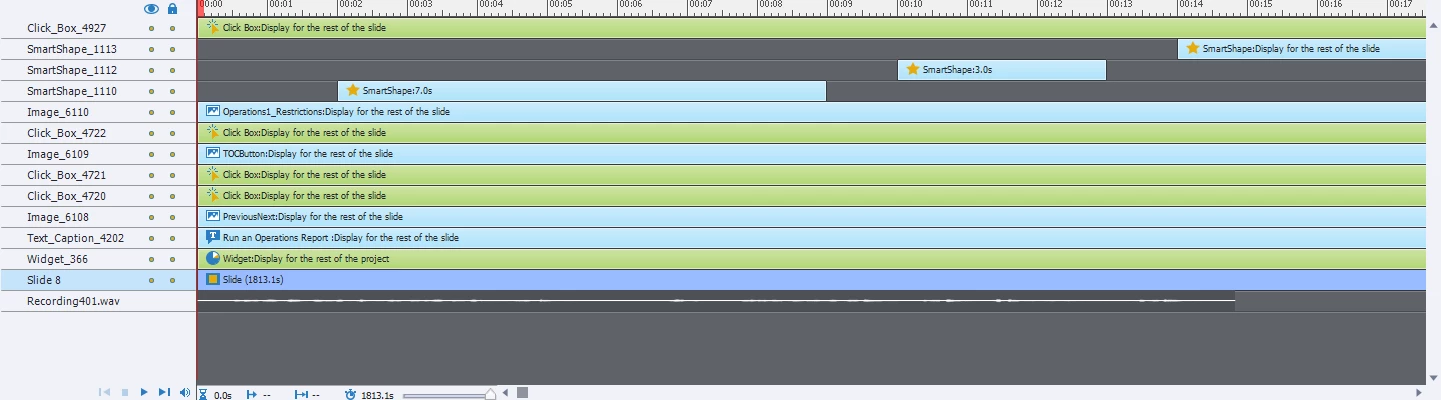
But I get nothing when I run the course. The really weird thing is that the audio for most other slides plays back just fine. HELP!!!

This topic has been closed for replies.
Correct answer Lilybiri

This is a long slide.  Move the audio clip a little bit further to the right, may help for make sure the audio clip is loaded. You have already a gap after the clip, but it starts on the first frame.

1 reply

Lilybiri
LilybiriCorrect answer
Legend
April 29, 2019

This is a long slide.  Move the audio clip a little bit further to the right, may help for make sure the audio clip is loaded. You have already a gap after the clip, but it starts on the first frame.

Inspiring
April 29, 2019

Wow! Yes, that seems to have fixed it. I don't fully understand how or why that was a problem (or how I should have known that the current setup was a problem), but I'm happy to have the fix.

THANK YOU SO MUCH!

Lilybiri
Legend
April 29, 2019

Will try to explain. Audio clips are pretty large compared with other items, even when they are compressed to MP3 as will happen on publish. They are not loaded at the start of the course, but at the start of each slide containing audio clips. To offer a little bit more time, moving the audio clip a little bit away from the start helps often. Moreover if you have audio clips from the first to the last frame of each slide, Captivate could imagine that those are part of one big audio clip distributed over slides. It will then try to load all at once, which can certainly cause synchronization problems for the first and following slides.

You could have found this tip (and many more) on my blog:

Audio in Captivate - More Tips - Captivate blog