sameraining
Participant
October 22, 2015
Answered

Some smart shapes not available in Captivate 8

  • October 22, 2015
  • 2 replies
  • 215 views

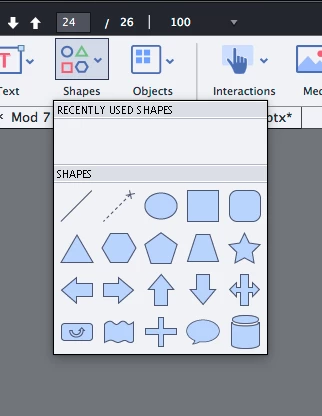
Hello, as per the image below, I cannot see all the available smart shapes for insertion into my projects. I know I have seen many other shapes available there and I have used them in other projects. Why can't I see them?

Thank you.
    This topic has been closed for replies.
    Correct answer Lilybiri

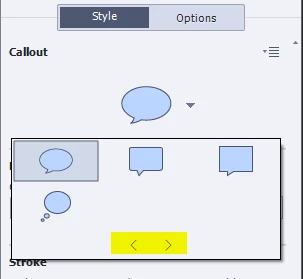
    In Captivate 8, that window shows only some types of shapes. Once you have selected a 'type' the other shapes similar to it will appear in the Properties panel, Style tab, Callout part (luckily this has changed again in CP9, because it was very confusing):

    This screenshot shows the Callout after I choose the only Text Cloud shape available.

    2 replies

    Lilybiri
    LilybiriCorrect answer
    Legend
    October 22, 2015

    In Captivate 8, that window shows only some types of shapes. Once you have selected a 'type' the other shapes similar to it will appear in the Properties panel, Style tab, Callout part (luckily this has changed again in CP9, because it was very confusing):

    This screenshot shows the Callout after I choose the only Text Cloud shape available.

    sameraining
    Participant
    October 26, 2015

    Thank you.

    RodWard
    Community Expert
    Community Expert
    October 22, 2015

    Are you creating a Responsive project?