fefe_81_
Participant
December 20, 2014
Answered

Specific viewer from Ppt for presenter 10

  • December 20, 2014
  • 1 reply
  • 342 views

Dear all,

Just a short question about Presenter 10... how to use a specific skin (logo, ) and navigation (button next, resources,replay, progress bar,..) included in ppt and published without the Presenter classic viewer?

Thanks for your future help.

Best regards

This topic has been closed for replies.
Correct answer Jorma_at_Knox

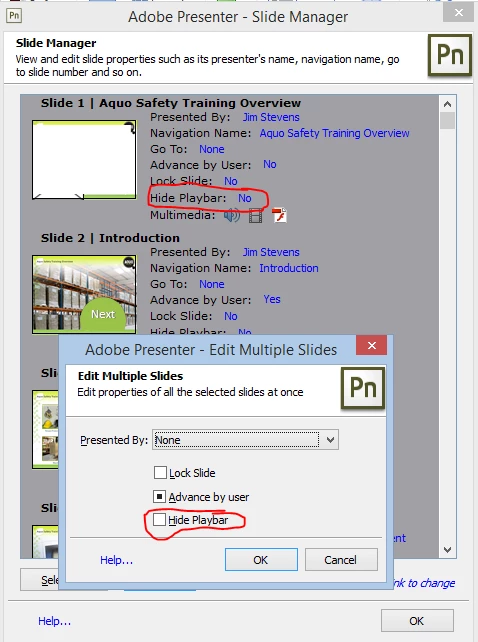
Well, I'm surprised I wasn't called out on my misinformation. In the Slide Manager tool in Presenter 10 (I think it was in 9 too ) there is an option to hide the play bar...
1 reply

Jorma_at_Knox
Legend
December 22, 2014

There is no easy method. There was a post on here by robva65 a number of years ago with instructions on how to create a flash object in your PPT deck that hid the player skin, but that was the only option I've ever seen for Presenter. If I can find the post, I'll provide the link.

fefe_81_
fefe_81_Author
Participant
December 24, 2014

Thks for your answer.

The flash solution for the skin is not adapted with an Html5 export so .... Perhaps Ispring is the solution in this case ..

Best regards

Jorma_at_Knox
Jorma_at_KnoxCorrect answer
Legend
January 10, 2015

Well, I'm surprised I wasn't called out on my misinformation. In the Slide Manager tool in Presenter 10 (I think it was in 9 too ) there is an option to hide the play bar...