
December 23, 2016
Answered

Starting a Responsive Project on a Mobile Device

  • December 23, 2016
  • 1 reply
  • 184 views

Before I arrive at my first slide, I see a white slide, my TOC tab in the upper left corner of the screen and a big play button in the middle of my mobile device screen.

When I press the play button, I then see my REAL first slide. In the upper right corner, I see the hand gestures help icon.

I didn't program this first blank screen.  Is there any way I can populate this screen with my content? or create another first screen?

I don't know where this first screen came from.
    This topic has been closed for replies.
    Correct answer Lilybiri

    Autoplay is not allowed on some devices, that is why you see the Play button for responsive projects.

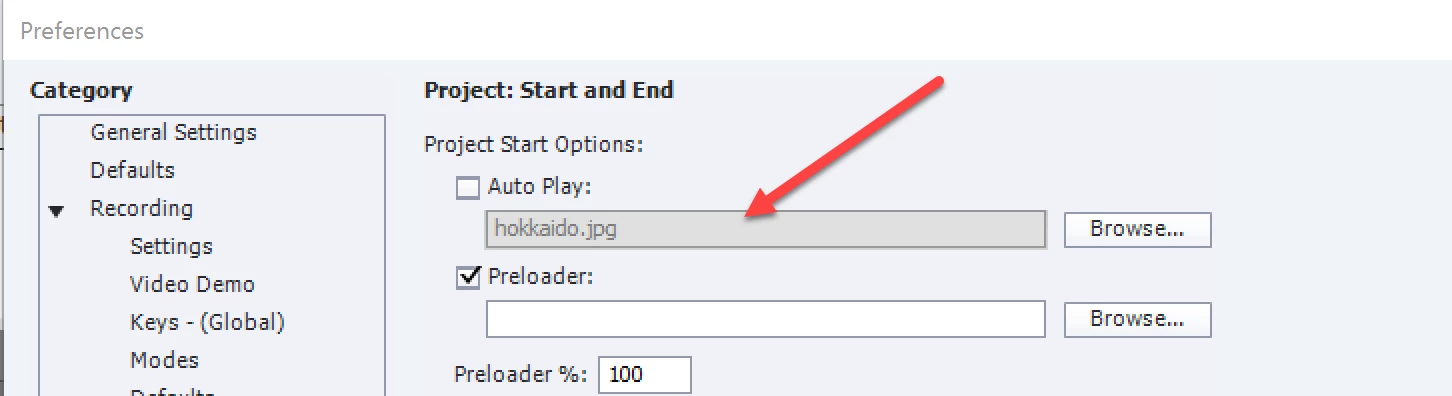
    To avoid the blank slide you can insert a 'poster' image. In Preferences, Project, Start and End:

    1 reply

    Lilybiri
    LilybiriCorrect answer
    Legend
    December 23, 2016

    Autoplay is not allowed on some devices, that is why you see the Play button for responsive projects.

    To avoid the blank slide you can insert a 'poster' image. In Preferences, Project, Start and End: