
Known Participant
October 4, 2018
Question

Still a bug in 2019 - Recording a software simulation with the mouse

  • October 4, 2018
  • 1 reply
  • 408 views

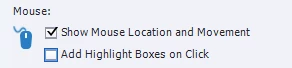
This is an issue that I noticed in 2017 Captivate, but still showing up with 2019. If you record a software simulation with the Show Mouse Location and Movement selected, and add details to the project (text box, smartshapes, etc.) the formatting and alignment is thrown off and the project is unusable.
This topic has been closed for replies.

1 reply

Participant
December 17, 2018

I need help too.

Even if i only selected de "show mouse location" and not the other one. I still have an unusable project

Lilybiri
Legend
December 17, 2018

THere is no answer to this question, because myself (and probalby others) cannot reproduce the prolems. Do you Run Captivate as Administrator if you are on Windows?

Participant
December 17, 2018

i try in admin mode and no change.

when i use keyboard, it works. But there is no screen shot when i use the mouse.

So when i stop my software simulation i only have 1 slide. The last screen i had.