March 21, 2016
Answered

Stop all automatic navigation?

  • March 21, 2016
  • 2 replies
  • 343 views

I have looked around, and the only things I could find are to make a button pause the project or set the pause in the timeline, or the slide duration to a really long time.
However, I don't want any of that. I want to simply tell all slides to NEVER navigate. I have my own buttons which do everything.

E.g. I want to be able to click this increment score button 10000000 times without ever worrying about the slide navigating to the next:

a8Z5Frq.png

Thank you in advance.

    This topic has been closed for replies.
    Correct answer mohanadas

    Hi,

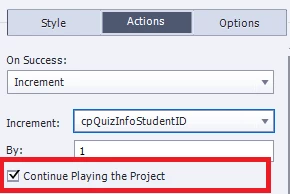
    In Captivate 9 you have a checkbox in the PI :

    which allows you to decide if you want to continue the project or not after the action is performed.

    Can you try this and see if it helps?

    Thanks,
    Mohana

    2 replies

    mohanadas
    Adobe Employee
    mohanadasCorrect answer
    Adobe Employee
    March 21, 2016

    Hi,

    In Captivate 9 you have a checkbox in the PI :

    which allows you to decide if you want to continue the project or not after the action is performed.

    Can you try this and see if it helps?

    Thanks,
    Mohana

    March 21, 2016

    Yes, thank you.

    That has done what I wanted it to.

    Lilybiri
    Legend
    March 21, 2016

    That was the reason I asked about version number, because this us new in

    CP9. BTW did you install the patch? Present version is 9.0.1.320

    Lilybiri
    Legend
    March 21, 2016

    Which version do you use? Does that increment button have a pause?

    Sent from my iPad

    March 21, 2016

    Captivate 9.

    No, the button performs the action "increment myScore by 1".

    However, I don't want it just for this button. I want the entire project to never move forward.