
Participating Frequently
December 16, 2020
Question

Storyboard printout not showing Accessibility Data

  • December 16, 2020
  • 1 reply
  • 430 views

I am working on an elearning project that will use Text Speach. The client has asked us to rename all button and images for this exact purpose.

I have changed all of it by going in the Accesibility feature in the Properties tab. I have also changed the name of the images in the library.

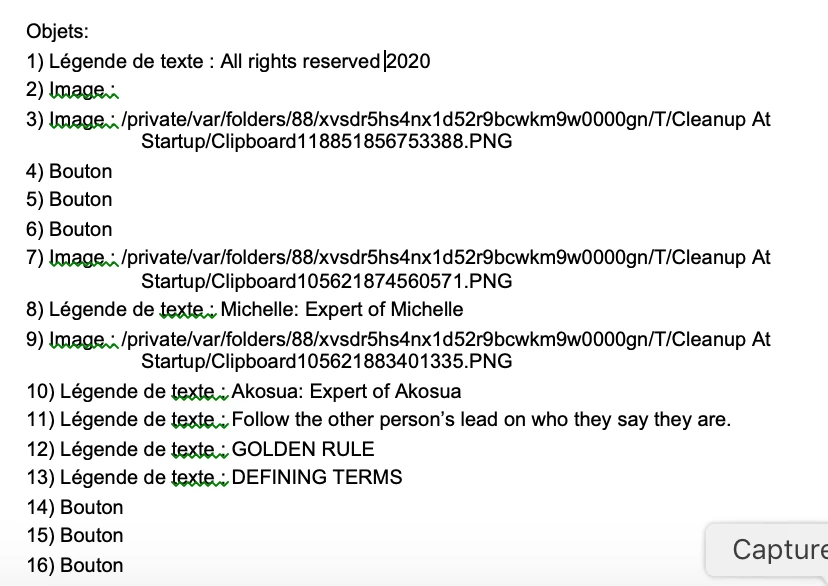
But, when I print out the Storyboard (from the Print feature), I don't see the changes.

I did enable accessibility in the Preferences.

Is there something I am not doing right? Or did not set up right?

Also, is there a reason why I always see 3 lines for button when I only have one in the page?

Here is a screen capture of what I see in the printout.


    This topic has been closed for replies.

    1 reply

    Lilybiri
    Legend
    December 16, 2020

    Etes-vous sûr de comprendre ce qu'il fallait? Le nom du bouton n'a pas changé, le changement doit se faire dans la panneau de Propriétés, pas dans le 'Accessibility' feature. 


    Participating Frequently
    December 16, 2020

    J'ai des éléments qui reviennent sur chaque page. Donc, dans les documents d'aide de Captivate, ça dit de cliquer sur les trois lignes à côté du titre de l'objet et d'ajouter du texte.

    C'est ce que j'ai fait. Et ça n'apparaît pas dans le document.

    Lilybiri
    Legend
    December 16, 2020

    Est-ce que le bouton a un nom ici? Ce bouton (hexagone) a un nom SA_Bt5. Je n'ai aucune idée de ces 'trois lignes' dont vous parlez. Ou est-ce que vous voulez dire le menu 'hamburger", qui a 4 lignes et l'option Accessibility? Cela n'est pas le nom de l'objet mais un texte qui peut être ajouté en plus pour expliquer.