Known Participant
January 22, 2014
Answered

Strange issue in custom Success/Failure captions

  • January 22, 2014
  • 1 reply
  • 520 views

Hi,

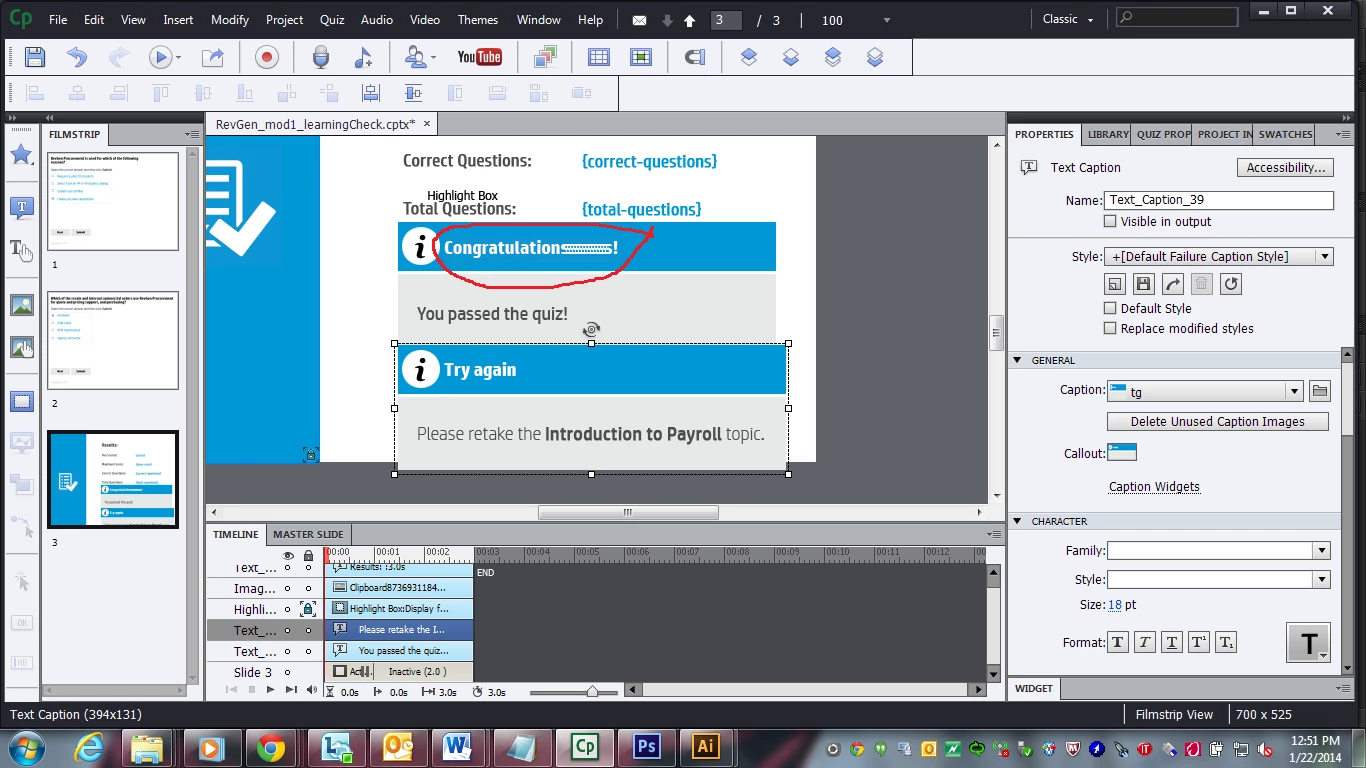
I have a strange issue in my custom Success/Failure caption. If I use 'S' letter in my customized caption .bmp file, it is not showing properly in the captivate. Attached file is for your reference. I tried converting text into image in photoshop, still it shows the same thing. Any thoughts??
Thanks in Advance,

-Ajay

    This topic has been closed for replies.
    Correct answer RodWard

    OK.  That's what I thought.

    So what I think is going on here is due to the way Captivate assembles text captions that can stretch to any size based on the component images.  I think your corner image that contains the text is being stretched right at the point where the S character is located on the end of Congratulations.  Captivate is achieving the resizable text caption by repeating the last few pixels of each background image.

    If you want to test my theory, just make your Congratulations text slightly shorter (use a condensed font or make the font size smaller) and I think your issue will go away.

    1 reply

    RodWard
    Community Expert
    Community Expert
    January 22, 2014

    Is the word "Congratulations" just text inserted into the caption within Captivate, or is it actually set in one of the images that make up the caption?

    ajaylankiAuthor
    Known Participant
    January 22, 2014

    Yes Rod, It is inside the image that make up the caption.

    Thanks,

    Ajay

    RodWard
    Community Expert
    RodWardCommunity ExpertCorrect answer
    Community Expert
    January 22, 2014

    OK.  That's what I thought.

    So what I think is going on here is due to the way Captivate assembles text captions that can stretch to any size based on the component images.  I think your corner image that contains the text is being stretched right at the point where the S character is located on the end of Congratulations.  Captivate is achieving the resizable text caption by repeating the last few pixels of each background image.

    If you want to test my theory, just make your Congratulations text slightly shorter (use a condensed font or make the font size smaller) and I think your issue will go away.