
Participating Frequently
April 8, 2018
Answered

Strange Text Artifacts appearing in preview and publish-but not while editing?

  • April 8, 2018
  • 2 replies
  • 1434 views

Hello,

I have been grappling with this issue for some time, and Im hoping its just something simple that i've missed.

Captivate 2017, Windows 10 Machine, Responsive project

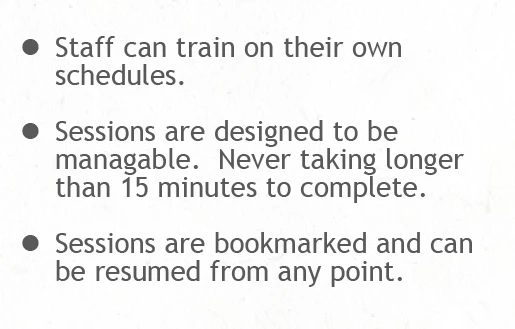
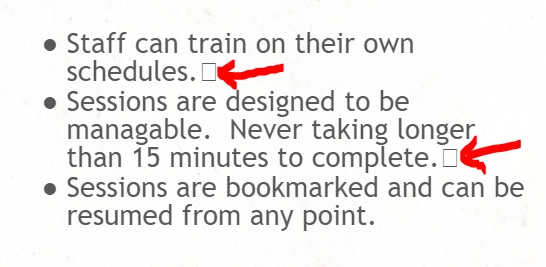
Im getting these STRANGE text artifacts in my text boxes that I can't seem to correct while editing normally.  They only appear when I preview or publish my work.

In Captivate:
Published:
Any ideas on what I missed?  Thank you in advance for any tips or education offered!

    This topic has been closed for replies.
    Correct answer Lilybiri

    Lilybiri,

    Thank you for the reply, Im not sure what you mean by "which returns" did I insert.  I have been typing normally and using the enter key to create a new line when needed.  Is this not best practice for captivate?

    No copy/paste from word, the result appears even when I create a brand new text caption.  From pasting into notepad I can see that this box character only appears when i use the enter key to create a new line.  Any ideas on how I should be creating text on screen instead?  Thank you for the guidance!


    On some keyboards the Enter key is named 'Return'. You can combine with CTRL or other combination keys to have a soft return instead of a hard return. That is what is causing those articfacts. Sorry that I was so short... did type too much that day.

    Copy/paste from Word can also cause insertion of artifacts because of the formatting in Word wich is not always ideal.

    2 replies

    Paul Wilson CTDP
    Community Expert
    Community Expert
    April 9, 2018

    You have pasted formatted text from a word processor or a presentation file like Microsoft Word or PowerPoint. I use an application called PureText that is free to download. I will strip out any formatting from copied text. You can download it from here: http://stevemiller.net/puretext/

    Paul Wilson, CTDP
    BrandicusAuthor
    Participating Frequently
    April 10, 2018

    Paul,

    Thank you for the reply, Im going to try it out now and let you know the results.  It seems silly that I will have to do this for every text entry in captivate though. 

    Strangely enough this is happening whether or not I am pasting from another application.  It seems to happen when I use the enter key to create a new text line.  Any thoughts or ideas as to why?  Captivate does not appear to have many text formatting options.

    David Burnham HBA
    Inspiring
    April 8, 2018

    By chance do you copy and paste your content into the text box? ie. from Word?

    BrandicusAuthor
    Participating Frequently
    April 9, 2018

    David,

    Thank you for the reply, I tried making a fresh text box thinking that would do it and manually typed in the text.  Unfortunatley the issue remains.

    David Burnham HBA
    Inspiring
    April 9, 2018

    As an instructor I always ask my students to ensure that they are actually bringing in real text - a simple way to ensure you are getting no hidden characters is to paste it into notepad - its free and on your Windows system and then paste into Captivate.

    Other issue what font are you using in your text box and is it installed on your system.