



Stuck on Update Missing Fonts
Captivate 2019 (11.5.5)
I had three captivate project files that were developed around the same time last year.
When I reopened them individually to make edits, I received the Update Missing Fonts window.
For the first two projects I selected Replace Fonts, and no problem. The captivate project files opened, I edited them, no problem, published new scorms and they work fine.
I'm not sure why the third of the series of three doesn't like the Update Missing Fonts window. No matter what I do from this window (Update, Close, select don't show me again, blah, blah, blah). It gets stuck on 50%. I need to use windows task manager to close captivate. I read in another post to use CleanPreferencesWin.bat, which executed it, but no change.
Please help. I need to make one minor edit to change a text date in this file and cant do anything in it.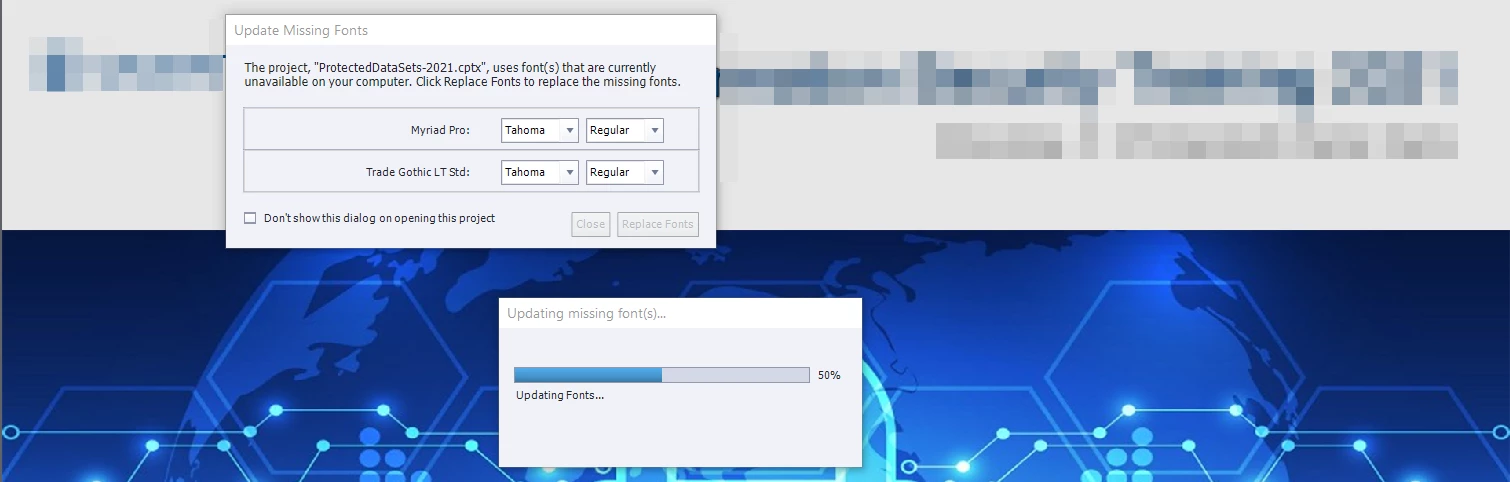
 AdChoices