Answered
Style in Correct Answer List (Review Mode)
CP9
I need change the style (size of type) in the list of correct answers when i see the review mode. Default size is very small. It's a style? Can I change it?
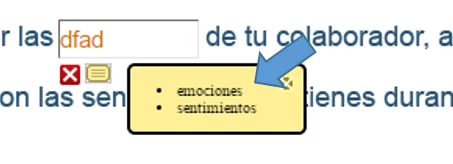
Thank you!.

CP9
I need change the style (size of type) in the list of correct answers when i see the review mode. Default size is very small. It's a style? Can I change it?
Thank you!.
If you can address it by changing the CSS that will be the best solution. Other solution would be to create a custom feedback and use a conditional action On Enter checking if the slide is in Review Mode.
Already have an account? Login
Enter your E-mail address. We'll send you an e-mail with instructions to reset your password.
 AdChoices