Participating Frequently
November 23, 2022
Answered

survey help needed - how to use advance action to go to specific question

  • November 23, 2022
  • 1 reply
  • 751 views

I created a survey and have about six survey question slides set up.  I need help setting up an action where depending on answer that is given it goes to a specific survey question #. 

for example question #1 is a yes/no answer.  What setup do I need to do exactly where if someone selects "yes" in question #1 it goes to question #2.    If someone selects "no" it will then go to question #3 instead.

    This topic has been closed for replies.
    Correct answer Lilybiri

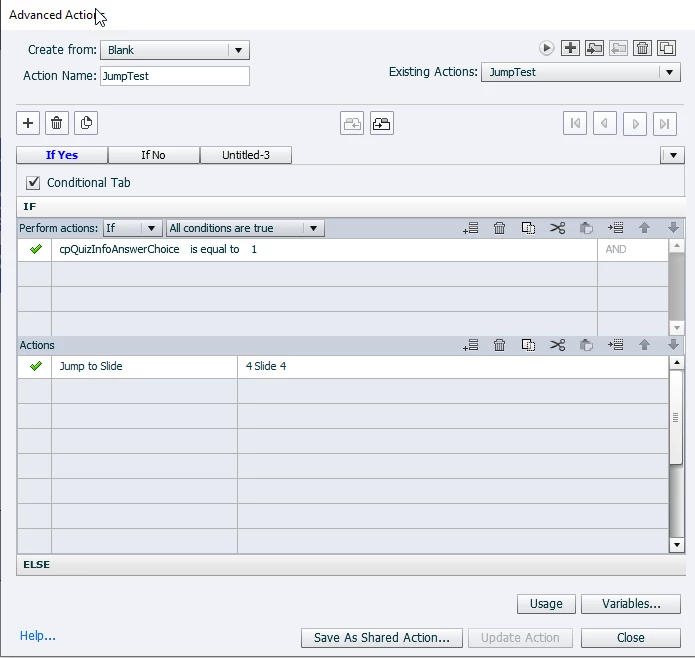
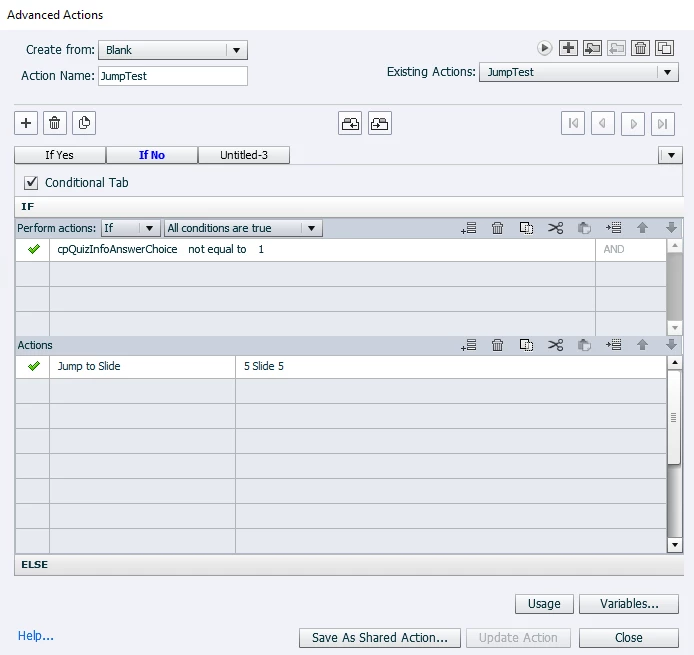
    I changed the Advanced Action to two parts, If Yes and If No headers.  Is that not the right way to do it, still didnt work:


    Please, just use one decision:

     IF cpQuizInfoAnswerChoice is equal to 1

        Jump to slide 4

    ELSE

         Jump to slide 5


    You definitely need some training on advanced actions, sorry to tell you. Why use two decisions? 

    It also helps a lot if you label your slides with a significant name instead of using the generic names.

    BTW I knew you set up the questions as survey. That was the reason I pointed to that blog.

    1 reply

    Lilybiri
    Legend
    November 23, 2022

    Are you talking about default quiz slides set up as 'Survey' or did you use the specific Survey slides, based on the Likert master slide? From your description I think it is the first scenario.

    It is possible to use the value of the quizzing system variable cpQuizInfoAnswerChoice for that purpose. You'll need shared or advanced actions to be triggered by the Success event of the question slide. I used that system variable in an example created for a webinar about conversion from SWF to HTML. Have a look:

    https://blog.lilybiri.com/using-cpquizinfoanswerchoice-for-survey-conversion-from-swf-to-html


    Participating Frequently
    November 23, 2022

    Below are my survey questions in order how I have them in Captivate, tried to take screenshots. 


    1st image is the first survey question they see and have to answer "Yes" or "No".   (I made each question as a survey response, is that correct when I set it up?):


    Second image (is where I want them to go next if they say "Yes")  basically the next survey question slide #2 so I dont think any advanced action is needed.


    third image is where I want them to go to if they say "No", I believe this is the one where advanced action is needed because I want to skip over survey question #2 and go to survery question #3.  But I cant get it to work:

     Below is the advanced action that is set up but its not working:


    Lilybiri
    Legend
    November 23, 2022

    To which event did you link that conditional action please? You didn't specify this. As I told before I would use the Success action of the first survey slide to do so.

    Did you read the blog? I don't think so, because you used the wrong value to check the system variable. This is a copy from the T/F explanation in the blog:

    Please take some time to read that blog post, it has all the info you need, and has taken quite a lot of my 'free' hours to compose. You cannot use True/False.