danielb51742821
Inspiring
March 22, 2018
Question

SVG has unexpected effect

  • March 22, 2018
  • 4 replies
  • 2474 views

Captivate 9 with all updates.

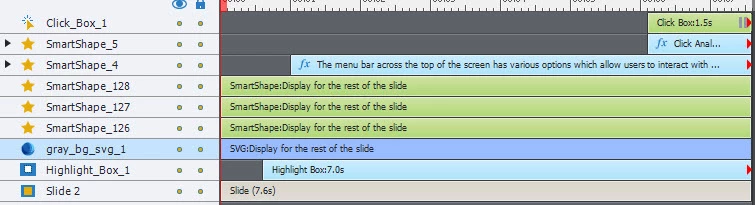
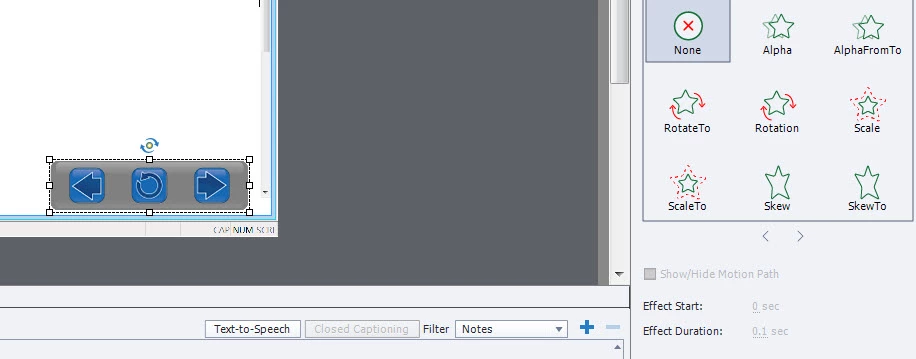
Strange finding here. I have a custom nav bar I made. Three buttons with a gray background which is an SVG. The gray background is the object causing a problem. The background does a quick, what appears to be, fade in on each slide. There is no fade on this object. There is no effect turned or applied on this object. However, the gray bg svg object does display an inactive "Effect Duration" for .1 seconds. This is the only thing I can think of that is causing the problem. Since it is inactive, I cannot change it to '0'.

Any advice?
    This topic has been closed for replies.

    4 replies

    Raph5911169558
    Inspiring
    June 9, 2021

    As of 2021 (and version 11.5.553) this problem still persists. I tried using an (SVG) icon, use as button, change up the over and down states. But when I Preview -> In HTML5 Browser, the SVG blinks completely out of existance before showing the correct state (over = 50% opacity, down = dark red)


    Lilybiri
    Legend
    June 10, 2021

    Flickering between states is very annoying with SVGs, please log (again) a bug report as I have done since multiple versions. It doesn't look to be a complicated SVG, mostly they suffer less.

    Here is a direct link to the bug report:

    Adobe Captivate: 1 (allegiancetech.com)


    Participating Frequently
    October 18, 2018

    To be honest, I would stay away from SVGs in Captivate. Our team has attempted to use SVG with v9 and v10 (2017) with varying degrees of success and failure, unfortunately mostly failure. We found that if more than one SVG is used per slide, SVG display becomes erratic and unpredictable with similar issues described by richards68233534​​. I submitted a bug report a year ago. This article suggests saving SVGs with CSS properties set to 'Presentation Attributes', but it didn't fix the problem for us. After battling with the bug for a long time we have given up and have reverted to using PNGs, which is disappointing as we use SVGs heavily for other aspects of our design work. Perhaps if any of the Captivate product team are reading these posts, I could ask that they prioritise some bug fixing in Captivate for the next point release rather than attempting to add another 'big feature'.

    ashmitab
    Participant
    December 6, 2018

    I totally agree with this.  I attended a captivate course and was strongly encouraged to use SVGs.  Its a nightmare!!

    David Burnham HBA
    Inspiring
    December 7, 2018

    I have had good success with svg when converting technical type drawing content from Illustrator for training technical engineers and services staff in automotive and recreational product industries.. For typical pixel based artwork like buttons I would use native png in my captivate work.

    eLearning_Pundits
    Participating Frequently
    March 28, 2018

    If I remember it correctly, it was an issue with Captivate 9 but now it's fixed in Cp2107. You may download a trial to test it.

    sassasol
    Known Participant
    March 28, 2018

    I have version 2017, license. What can be the issue?

    eLearning_Pundits
    Participating Frequently
    March 28, 2018

    Sorry, i just tried it and it SVG still blinks on next slide in Cp2017. Earlier I was using the SVG for rest of the project and it was not showing this behavior. I would suggest not to use SVG till it's fixed. You may report this to Adobe.

    www.adobe.com/products/wishform.html

    Erik Lord
    Inspiring
    March 24, 2018

    Check under the Timing panel, is there a 'Fade In and Out' option applied to this object, perhaps?

    danielb51742821
    Inspiring
    March 26, 2018

    No. First think I checked. Only happens when i publish to html5. SWF is fine.

    Lilybiri
    Legend
    March 26, 2018

    SVG has to be 'evaluated' (don't think that is the correct term, but hope you understand). I did see weird effects like that. What happens if you postpone the entry a little bit?

    Is there any reason why it has to be SVG, I don't think there is a lot of difference in file size with a grey rectangular shape. Personally I would never use a SVG for such an item.