Inspiring
March 3, 2016
Answered

Switching Captivate Themes Creates Additional Text and Button Styles

  • March 3, 2016
  • 1 reply
  • 381 views

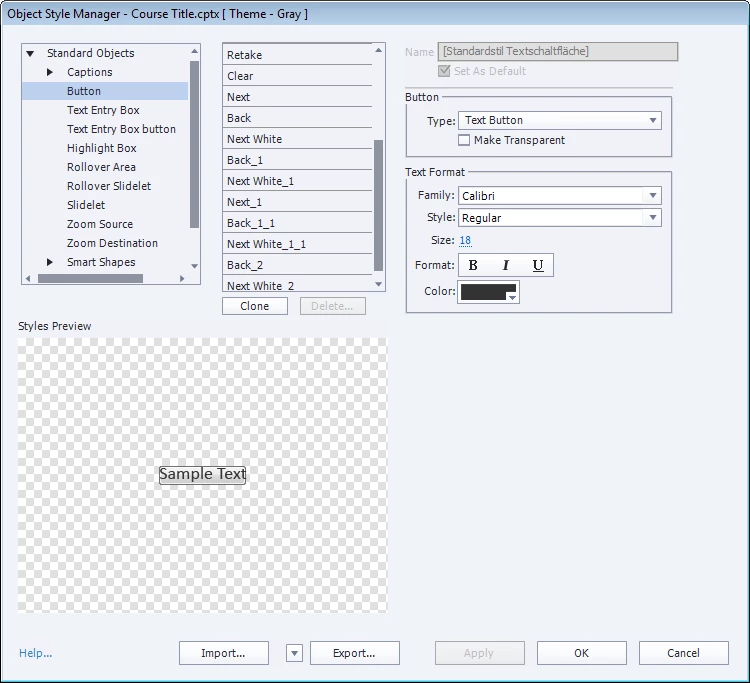
I'm using Captivate 8 and when I switch Captivate themes more text and button styles are created. They are added with an underscore and a number as seen below. Does anyone know how to stop this?

    This topic has been closed for replies.
    Correct answer Lilybiri

    Which version of 8 do you use? Latest number starts with 8.0.3. I cannot remember this bug, but first want to check if you installed the patches.

    Are the styles that you show Custom styles? And you gave those styles the same name in the original Theme and the theme that you use to replace the original one? In that case, I don't think it is a 'bug' but by design none of the styles are deleted. Only the 'Default' styles, between brackets, will be replaced. I tend in a custom theme to assign custom styles as much as possible to Default styles, maybe that is the reason why I didn't see this really as an issue. I thought themes were meant to save time, and default styles, when applying a new theme, will immediately result in having changes in the project. For all other styles you do have to apply them again, right?

    1 reply

    Lilybiri
    LilybiriCorrect answer
    Legend
    March 4, 2016

    Which version of 8 do you use? Latest number starts with 8.0.3. I cannot remember this bug, but first want to check if you installed the patches.

    Are the styles that you show Custom styles? And you gave those styles the same name in the original Theme and the theme that you use to replace the original one? In that case, I don't think it is a 'bug' but by design none of the styles are deleted. Only the 'Default' styles, between brackets, will be replaced. I tend in a custom theme to assign custom styles as much as possible to Default styles, maybe that is the reason why I didn't see this really as an issue. I thought themes were meant to save time, and default styles, when applying a new theme, will immediately result in having changes in the project. For all other styles you do have to apply them again, right?

    SM6601Author
    Inspiring
    March 4, 2016

    8.0.1 I'm working on getting the update.

    RodWard
    Community Expert
    Community Expert
    March 4, 2016

    This bug (if it IS a bug and not by design) exists even in Captivate 9 as well.