
Participant
March 19, 2018
Answered

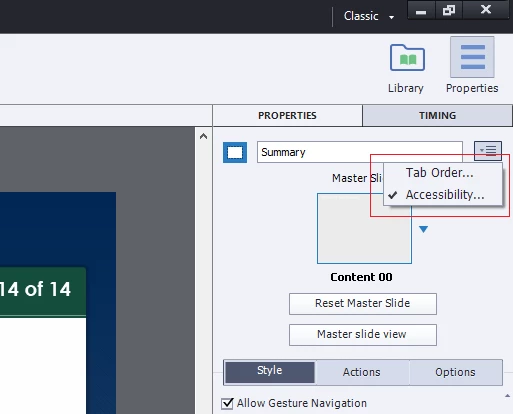
Tab Order and Accessibility panels will not open.

  • March 19, 2018
  • 2 replies
  • 269 views

This is very strange.  The page Tab Order and Accessibility dialog panels (upper right corner) no longer open.  When I click on the drop-down links, nothing happens.  I opened some old projects, and they now have the same issue.  So, this appears to be a Captivate 2017 problem, not a corrupted project.  I have re-booted my computer several times.  Note I can still add accessibility text to graphic objects.  Any suggestions would be appreciated.
    This topic is closed to new replies. Start a new post to keep the conversation going.
    Correct answer RodWard

    Clear your cache.

    If that doesn't work, reset your Preferences.

    http://www.infosemantics.com.au/adobe-captivate-troubleshooting/basic-troubleshooting-techniques

    2 replies

    RodWard
    Community Expert
    RodWardCommunity ExpertCorrect answer
    Community Expert
    March 20, 2018
    Participant
    March 20, 2018

    Thanks Rob!  That worked.  Very much appreciated!